Multi-Format Note Syncing: Keep Every Note Tied to Its Source
Updated · 14 min read
Listen to this post
Contents
- TL;DR
- Table of Contents
- What multi-format note syncing actually covers
- Start with what has to survive the move
- How to sync text, audio, handwritten and structured notes
- Text and highlights
- Podcasts and video
- Voice notes
- Handwriting
- Structured notes
- Preserving formatting, images, timestamps and source links
- When notes fail to sync or conflict
- Exporting, backing up and protecting your notes
- Privacy when notes are shared
- Choosing a setup for your situation
- A weekly routine that keeps everything in sync
- Our perspective
- Try it with your own sources
- FAQ
- What is multi-format note syncing?
- Can I sync podcast and video notes with my article notes?
- What should I do if two versions of a note conflict?
- Is syncing the same as backing up?
- Which Omphalis plan do I need for PDF notes?
- Sources
- Recommended
Multi-format note syncing means your notes from articles, PDFs, podcasts, videos and voice memos follow you across devices and stay usable, with their formatting, timestamps and links to the original intact. The most reliable way to get there is to stop syncing loose notes and keep each note attached to the passage or moment it came from. That is how we build Omphalis: you save the source, read or listen in one place, and your highlights and notes sit beside the exact passage on web, iPhone, Android, Mac and in the Chrome and Firefox extensions.
TL;DR
- "Syncing" breaks when notes are detached from their sources. A sentence of text with no link, page or timestamp is hard to trust a month later.
- Decide what must survive the move: formatting, images, timestamps, the original link. Then choose one home that preserves them.
- Convert handwriting and audio to text only after saving the original, and keep both.
- Export a copy regularly. A sync is not a backup.
- In Omphalis you can save web pages, PDFs, EPUB and DOCX files, podcasts, YouTube and voice notes in one Library, with notes kept beside the passage. A 14-day trial needs no card.
Table of Contents
- What multi-format note syncing actually covers
- Start with what has to survive the move
- How to sync text, audio, handwritten and structured notes
- Preserving formatting, images, timestamps and source links
- When notes fail to sync or conflict
- Exporting, backing up and protecting your notes
- Choosing a setup for your situation
- A weekly routine that keeps everything in sync
- Our perspective
- Try it with your own sources
- FAQ
- Sources
What multi-format note syncing actually covers
Most people have notes in four or five shapes at once:
- Typed text: meeting notes, pasted quotes, outlines.
- Highlights and margin notes on web articles, PDFs and ebooks.
- Audio: voice memos, and moments you want to revisit in a podcast.
- Video: a timestamp and a thought from a lecture or YouTube talk.
- Handwriting: notebook pages or tablet scribbles.
Each format stores its own kind of anchor. A web highlight is anchored to a passage. A podcast note is anchored to a time. A PDF note is anchored to a page. A handwritten note is anchored to nothing unless you add it. When a tool syncs these "across devices and apps" it usually moves the text and drops the anchor. That is the loss that matters, because the anchor is what lets you check a claim, cite it, or find the surrounding argument.
A university library guide on note-taking software makes a useful point: no single digital tool fits every need perfectly, so you should choose based on what you need to do, remember, and how long you need it. Apply that to syncing. A grocery list and a literature review do not need the same guarantees.
Start with what has to survive the move
Before choosing a tool or a sync route, write down the four things you cannot afford to lose.
- Formatting. Headings, lists and emphasis in your own notes, and the structure of the source text.
- Images and attachments. Figures from a paper, a photo of a whiteboard, a scanned page.
- Timestamps. The minute and second in an interview, podcast or lecture.
- The link back. The URL, the file, the page number, the exact passage.
If you keep notes in a plain-text app and a separate reading app and a separate audio app, you are asking three systems to agree about all four. They rarely do. The simplest improvement is to reduce the number of places where notes are created, so there is less to reconcile.
How to sync text, audio, handwritten and structured notes
Text and highlights
These are the easy case, provided the highlight keeps its passage. Capture the highlight inside the reading view, not in a separate document, so the note and the sentence it refers to are one object. In Omphalis you read in a clean view with a way back to the original page, and your highlights and notes stay beside the passage on every device you sign in on.
Podcasts and video
The note is worth little without the moment. When you hear something worth keeping, capture the time along with your thought. Our guides on a podcast note-taking system that works and on annotating YouTube videos into study-ready notes walk through the routine step by step. Omphalis accepts podcasts and YouTube as sources, so the transcript-side passage and your note live together instead of in a separate app.
Voice notes
A voice memo is the fastest capture and the hardest to search. Save the audio itself, not only a transcription, and put it in the same Library as the source it reacts to. Omphalis takes voice notes as a source type, so a spoken thought sits next to the article or paper that prompted it.
Handwriting
Handwritten pages need a two-step approach. First keep the original scan or photo, because text recognition makes mistakes on names, symbols and formulas. Then add a typed line of context: what the page is about, which source it relates to, the date. That one line is what lets the page sync into a typed system without becoming an orphan. Annotating directly on a document is an alternative; for tablet readers, see our workflows for annotating PDFs on iPad.
Structured notes
Structured notes, such as a table comparing three papers, or a note linked to other notes, are the most fragile in transit because links between notes rarely survive an export to another app. Keep the structure inside one system that supports it. Omphalis offers Comparisons and Notebooks for this, and our write-ups on organizing notebooks in 5 to 15 minutes a week and Zettelkasten for students show how to keep the structure tidy over time.
Preserving formatting, images, timestamps and source links
The rule is simple: capture the anchor at the moment of the note, not afterward. Reconstructing a page number or a timestamp a week later is guesswork.
| What you want to keep | Where it usually gets lost | What to do |
|---|---|---|
| Original link | Copying text into a plain note | Save the source itself, then annotate inside it |
| Page number | Exporting a PDF note as plain text | Note the page in the line itself, or export with citations |
| Timestamp | Transcribing audio to text | Keep the time beside each transcribed idea |
| Images and figures | Moving between apps with different attachment rules | Keep images in the source view; export to PDF when you need a portable copy |
| Headings and lists | Pasting between editors | Use a consistent simple structure, such as headings and bullet lists |
One habit pays off more than any tool setting: decide how much of a source you actually need. Omphalis lets you choose how far each save goes: Clean, Structure or Full. A quick article you may never reopen does not need the same treatment as a paper you will cite. Matching the depth to the value keeps your Library from filling with material you never use.
For PDFs, note the plan difference. PDF reading starts on the Pro plan at $9 a month. On Lite, at $4 a month, PDFs are kept by name and page count only. If PDFs are central to your notes, that is the plan boundary to plan around.
When notes fail to sync or conflict
Sync problems nearly always fall into three patterns. Here is how to handle each.
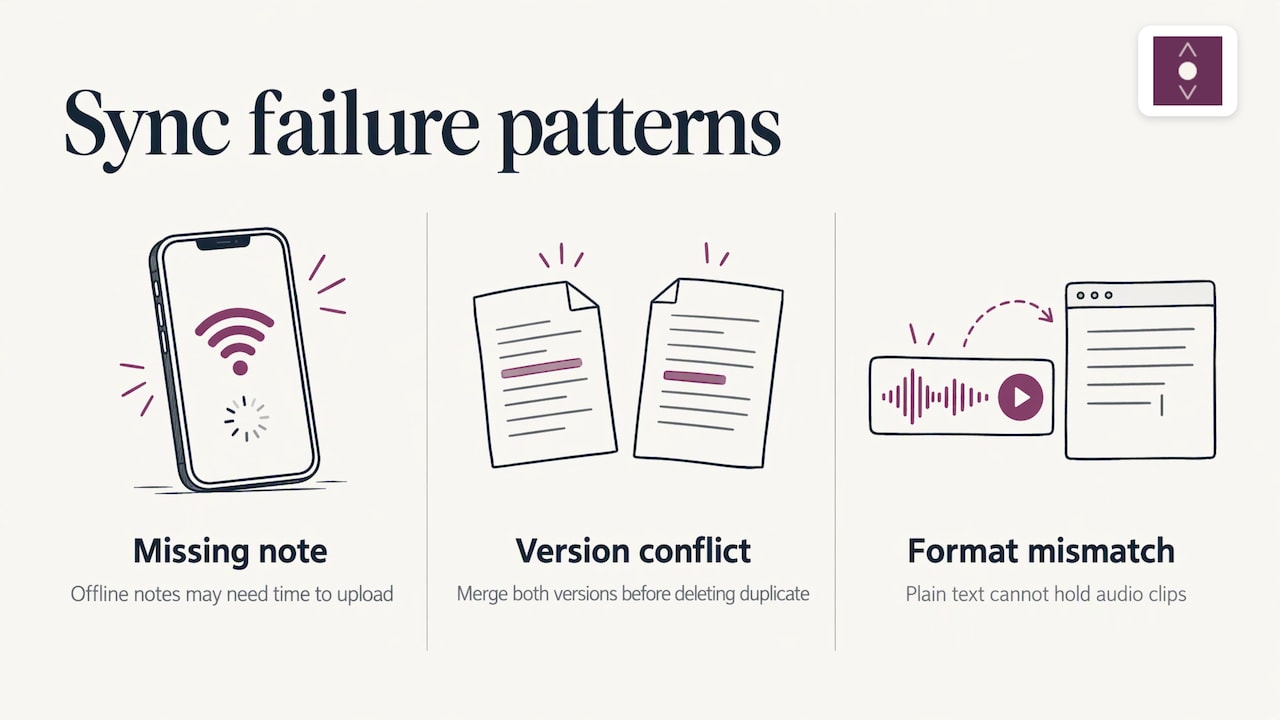
1. A note is missing on one device. Check that you are signed in to the same account on both, that the device is online, and that the note was saved rather than left in a draft state. Then reopen the app so it can refresh. If you added the note offline, give it time to upload once you are connected before assuming it is lost.
2. Two versions of the same note. This happens when you edit on a phone and a laptop before either has synced. Do not delete either copy. Open both, merge by hand into the one you want to keep, and only then remove the duplicate. Most conflicts are a few lines, and merging by hand takes a minute.
3. A destination app that cannot hold the format. A plain-text editor cannot hold an audio clip, and a document file cannot hold a timestamped link. Do not force it. Move the text, and put the source link or the file name in the first line so you can find the original. Keep the original in the system that supports it.
A practical way to prevent most of these: pick one place where notes are created, and treat every other app as read-only. When you edit in only one location, conflicts are rare.
Exporting, backing up and protecting your notes
A sync copies your mistakes as quickly as your work. If you delete a note on one device, it can disappear from the others. That is why a sync is not a backup.
Build a small routine:
- Export on a schedule. Monthly is enough for most people; weekly during a big project such as a thesis or a book.
- Export in a format you can open anywhere. PDF is the safest for reading. Our guide on exporting notes to PDF without losing multipage attachments covers the pitfalls.
- Export citations with your notes when you are writing. Omphalis supports citation export, so references leave with the notes that use them.
- Keep one copy outside your daily tools, such as an external drive or a second account you control.
Privacy when notes are shared
Private notes and shared notes should not live in the same pile. If you share journals or reflections, think about what each reader should see before you send anything; this overview of sharing journal entries safely is a good starting point. For groups, Omphalis Workspaces keep shared sources, reading lists and margins separate from each member's personal Library, and leaders never see members' private marks or personal Libraries.
Choosing a setup for your situation
Students. Your enemy is volume: dozens of articles per course. Save sources to one Library, highlight as you read, and ask questions of your own sources, with answers that show where they came from, when you are preparing a paper. If a whole class reads together, a Workspaces Semester pass is one payment for a four-month term: $25 per student, $390 for up to 20 students or $690 for up to 40.
Researchers and lab leads. You need citations that survive. Import from Zotero or Google Drive, keep notes beside passages, and export citations. For how the approach compares with a reference manager, see Omphalis vs Zotero.
Podcast hosts and listeners. Keep the show, the time and the thought together. Our comparison of podcast note-taking apps worth paying for shows what to look for.
Pastors, writers and founders. You gather from many sources and return to them for months. Build a digital commonplace book so quotes stay linked to where they came from.
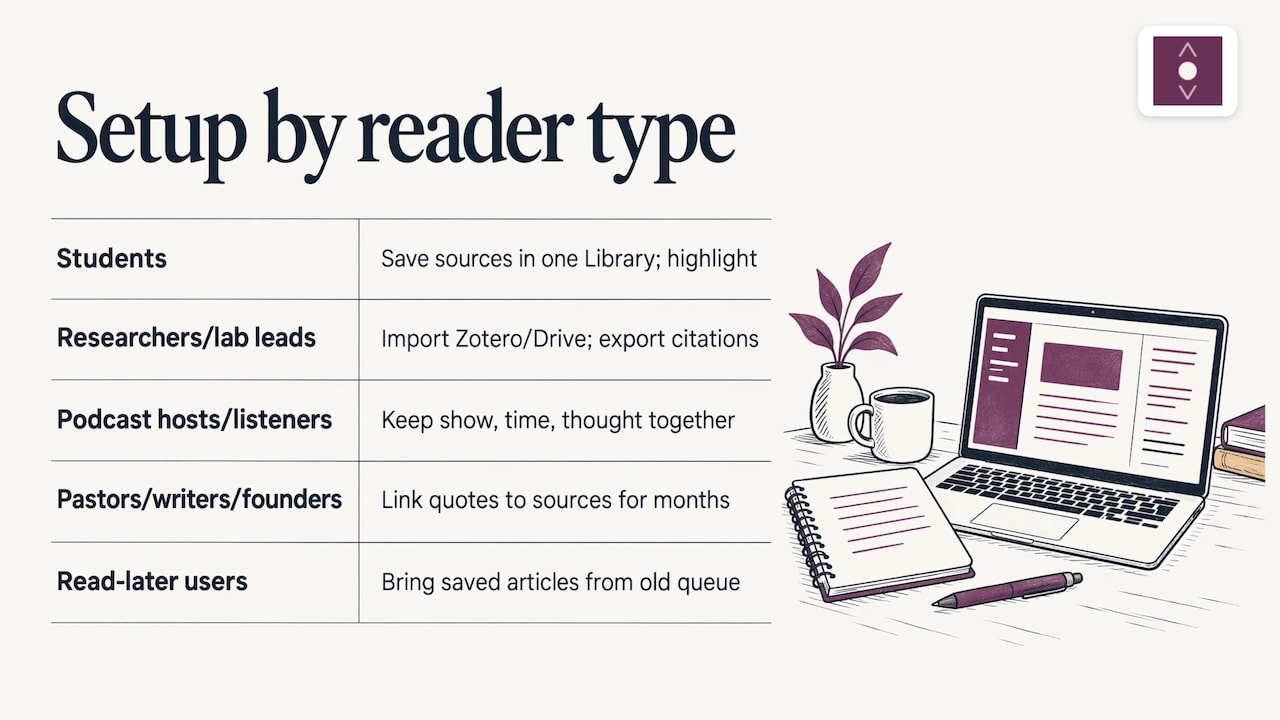
Moving from a read-later list. If your saved articles sit in an old queue, you can bring them over; see a home for your Pocket reading list. For a wider look at what different tools keep, read the best AI note-taking apps compared by what they preserve.
A weekly routine that keeps everything in sync
- Capture in one place. Save the article, PDF, podcast or video to your Library the moment you decide it matters.
- Mark as you go. Highlight and add a short note beside the passage. One sentence on why it matters beats a paragraph you will never write.
- Add the stray items. Voice memos and scanned pages go in with a line of context.
- Review for ten minutes. Reopen the week's notes and connect related ones in a Notebook or Comparison.
- Export monthly. Save a PDF copy and your citations.
The whole thing takes minutes, and it works because nothing in it depends on remembering where a note came from.
Our perspective
Most advice on syncing treats notes as text to be moved around. In our work on Omphalis we start from a different place: understanding comes from the source, so the source should never be left behind.
That is why we keep you in the source. You get help on the exact passage you are stuck on, your notes sit beside that passage, and when you ask a question of your own sources, the answer shows where it came from. A note that carries its origin can be checked, cited and revisited, on any device.
We built Omphalis for recurring work, not one-off summaries. Your personal Library is yours. Workspaces serve seminars, labs and reading groups, and keep shared work apart from each member's private marks.
Omphalis Team
Try it with your own sources
Omphalis has a Free plan with 40 units a month, and every account can start a 14-day trial with no card required. Paid personal plans run Lite at $4, Pro at $9 (where PDF reading starts), Premium at $19 and Scholar at $39 a month, with yearly billing at $40, $90, $190 and $390. Extra units come as packs: 200 for $10 or 600 for $30. See all plans and pricing, or if you run a seminar, lab or reading group, look at Omphalis Workspaces, which include a free pilot of up to 16 weeks for up to 30 seats.

FAQ
What is multi-format note syncing?
It is keeping notes from different kinds of material, such as articles, PDFs, podcasts, video, voice memos and handwriting, available and consistent across your devices. The best versions also keep each note's anchor: the passage, page or timestamp it came from.
Can I sync podcast and video notes with my article notes?
Yes, if they live in the same system. Omphalis accepts web articles, PDFs, EPUB and DOCX files, podcasts, YouTube and voice notes in one Library, so your notes from each can be asked about, compared and exported together.
What should I do if two versions of a note conflict?
Keep both until you have merged them by hand. Open each, copy the lines you want into the version you will keep, then delete the duplicate. To avoid it, create notes in one place and edit elsewhere only after the first device has synced.
Is syncing the same as backing up?
No. A sync mirrors changes, including deletions, across devices. A backup is a separate copy. Export to PDF and keep your citations on a regular schedule, and store one copy outside your everyday tools.
Which Omphalis plan do I need for PDF notes?
PDF reading starts on the Pro plan at $9 a month or $90 a year. The Lite plan at $4 a month keeps PDFs by name and page count only. The Free plan gives you 40 units a month to try the rest.
Sources
Recommended
A pausable voice tour of the workspace.