Omphalis vs Adobe Acrobat
Adobe Acrobat vs Omphalis: keep Acrobat for editing and signing, get through the hard section in Omphalis
Keep Acrobat for editing and signing. Omphalis does not edit, convert, fill, or sign PDFs. Acrobat is where PDFs are made, changed, combined, and signed, and Acrobat's assistant can answer questions about the files you open, with numbered sources in the answer. If your work is producing and managing documents, stay with Acrobat.
The problem this page is about is different. You are partway through a dense report or paper, one section assumes something you have not met, and you switch to another tool to get unstuck. Omphalis is a workspace for understanding. It helps you build understanding from the sources that matter to you: the explanation sits beside the passage that stopped you, your note is pinned to that line, and the page reopens at the passage when you come back. It works the same way with articles, video, and podcasts as with PDFs.
Start free
30-day trial, no card required. Includes 600 comprehension units, 200 Ask voice minutes and 15 assistant answers a day. After that, Free stays free. See plan allowances.
Disclosure: this comparison is written by Omphalis about its own product, so it is not a neutral review. We are not paid by Adobe Acrobat or by anyone else to be compared favourably, this page carries no affiliate links, and every claim about Adobe Acrobat is checked against their own public documentation. Read the full disclosures, and tell us if something here has gone out of date.
Checked October 20, 2026 against Adobe's assistant overview, plans page, answers help page, and requirements help page. Our suggestions about fit are our judgment.
Updated
What does Acrobat do well, and when should you stay?
Acrobat is the standard tool for PDFs. You can edit text and images, convert Office files, combine documents, fill forms, and collect signatures. Reader is free for opening, commenting, and signing. Acrobat's assistant adds questions and summaries on top: Adobe says you can ask across up to 10 files at once, each up to 600 pages and 100 MB, and that relevant sources in an answer are marked with numbers. PDF Spaces keep a set of files together with summaries, podcast style audio, and interactive visuals. Adobe also says your content is not used to train its models. If you need the document itself changed, sent, or signed, stay with Acrobat. Omphalis will not do that work.
Why do people switch tools in the middle of a hard section?
A good answer about a PDF is not the same as getting through it. The stuck moment is usually one paragraph: a method you have not seen, a term defined three sections back, an argument that turns on one sentence. You copy it into a chat window or a search tab, read an explanation there, and come back to find your place again. Adobe documents some limits on the in-document version: a text selection has to be under 8,000 characters and on a single page, prompts stay under 500 characters, and images and complex vector graphics are not supported. Omphalis is built around that stuck moment rather than around the file.
How do Adobe Acrobat and Omphalis compare?
| Compared on | Adobe Acrobat | Omphalis |
|---|---|---|
| Built for | Creating, editing, converting, combining, and signing PDFs, with an assistant that answers questions about the files you open. | Getting through a hard source: an explanation beside the passage that stopped you, notes pinned to the line, and a page that reopens there. |
| Editing and signing | Yes. Editing, forms, and e-signatures are what Acrobat is known for. | No. Omphalis does not edit, sign, or fill PDFs. Keep Acrobat for that. |
| Questions about a document | Ask about a PDF or a set of files, up to 10 at a time, each up to 600 pages and 100 MB. Relevant sources in the answer are marked with numbers. | Ask about the item you are reading, a notebook, a Space, or all your Spaces. Each numbered citation opens the passage it used, with the text around it. |
| Help with a hard section | Select text and ask about it. Adobe says a selection must be under 8,000 characters on a single page, and images and complex vector graphics are not supported. | Open an explanation beside the passage. The passage stays where it is on the page, and you keep reading from the same line. |
| Coming back to it | Comments, highlights, and PDF Spaces that keep files and their summaries together. | A mark with a note and a tag such as Confusing or Use later. Opening it later returns you to that passage in the source. |
| Reading view | The original PDF, exactly as it was laid out. | Extracted text with a section map. Figures, tables, and equations stay in the original PDF, so keep it open for those. |
| Formats | PDFs and the Office and image files Acrobat converts to PDF. | PDFs, EPUB, and Word files up to 90 MB, plus articles, podcasts, and video and YouTube links. |
| Price | Reader is free. Standard is US$14.99 a month, Pro US$19.99, and Studio, which includes Acrobat's assistant, US$24.99, on an annual plan billed monthly. | Free is $0. Pro is $9 a month or $90 a year. Free keeps a PDF but does not read it. |
What does getting through one hard section look like in Omphalis?
Say you are reading a 40 page policy report and section 4 leans on a cost model you have never used. Open the PDF in Omphalis and use the section map to go straight to section 4. Select the paragraph that stopped you and open an explanation. It sits beside the passage, so the sentence you were reading stays in view and you can check the explanation against it line by line. Mark the paragraph, tag it Confusing, and write the question you still have. Tomorrow, open the mark from your library and the page reopens at that paragraph with your note beside it. When you want to know whether the other reports you saved agree, ask across them and open each numbered citation to the passage it used.
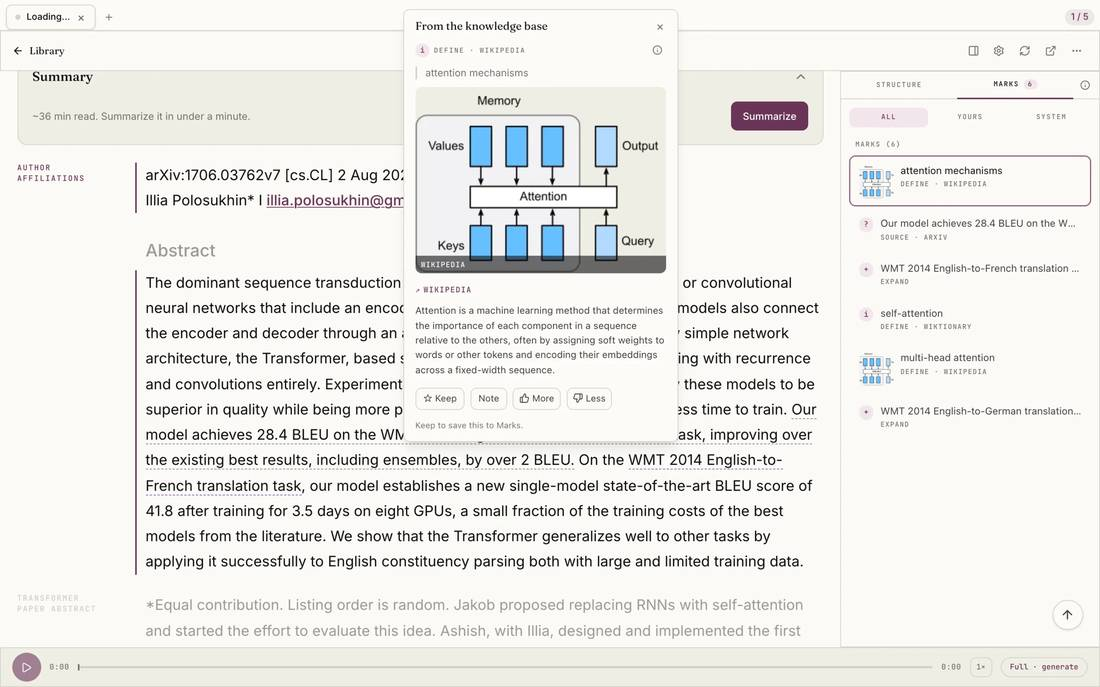
Select the image to see the detail.
Acrobat, LiquidText, or Goodnotes?
People comparing Acrobat for reading usually look at annotation tools too. LiquidText pulls excerpts out of a PDF onto a workspace and links them back. MarginNote turns excerpts into mind maps and flashcards. If you want handwriting and ink on an iPad, a note-taking app is the better fit, and Omphalis has no ink. Choose Omphalis when the problem is understanding the hard section and finding it again. Papers you cite are covered on the Zotero comparison.
How do you use Acrobat and Omphalis together?
Keep the original in Acrobat. Edit it there, sign it there, and look at figures, tables, and equations there, because the Omphalis reading page is extracted text. Bring the PDF into Omphalis when you need to understand it: open explanations beside the sections that stop you, mark what is still unclear, and keep the PDF next to the articles, talks, and podcasts on the same question. When you write or decide, reopen your marks and check the line before you use it. The guide to reading PDFs in Omphalis covers file sizes and what each plan reads.
Who should pick which?
When should you stay with Acrobat only?
Stay if you mostly create, edit, convert, fill, or sign PDFs, need the exact original layout, or only want quick answers and summaries about a file.
Visit Adobe AcrobatWhen should you add Omphalis?
Add it when you get stuck in dense sections, want the explanation beside the passage instead of in another tool, and need to come back to the hard parts over days or weeks.
See the Omphalis web appWhat do Acrobat and Omphalis cost?
Acrobat Reader is free. On Adobe's Acrobat plans, Standard is US$14.99 a month, Pro is US$19.99 a month, and Studio, which includes Acrobat's assistant, is US$24.99 a month, each on an annual plan billed monthly. Omphalis Free is $0. Pro is $9 a month or $90 a year.
Free keeps a PDF with its name and page count but does not turn it into a readable page. Every plan above Free, including the 30-day trial, reads PDFs up to 90 MB on current plans.
30-day trial, no card required. Includes 600 comprehension units, 200 Ask voice minutes and 15 assistant answers a day.
Monthly allowances for each plan are on pricing.
A good Acrobat companion for the PDFs you need to understand
If you need to edit or sign, Acrobat is the tool. If you need to get through a dense PDF, Omphalis puts the explanation beside the hard passage, pins your note to the line, and reopens the page at that passage, for PDFs and for articles, video, and podcasts.
Also compare Omphalis with Pocket, Omnivore, Instapaper, Matter, Glasp, Readwise, Heptabase, NotebookLM, Snipd, LiquidText, MarginNote, Elicit, Zotero, Perplexity, Goodnotes, Mindgrasp, Eightify or Recall.
Before you choose
Is Omphalis an Adobe Acrobat replacement?
No. Omphalis does not edit, convert, fill, or sign PDFs, and it has no desktop app. Keep Acrobat for all of that. Omphalis is a workspace for understanding the PDFs and other sources you need to get through, with an explanation beside the hard passage and a mark that brings you back to it.
How is this different from asking Acrobat's assistant about my PDF?
Acrobat's assistant answers questions about the file and marks its sources with numbers. In Omphalis the explanation opens beside the passage you are stuck on, your note is pinned to that line, and opening the note later reopens the page at that passage. The same works for articles, podcasts, and YouTube talks, not only PDFs.
Does Omphalis read PDFs on the free plan?
No. Free keeps a PDF with its name and page count but does not turn it into a readable page. Every plan above Free, including the 30-day trial, reads PDFs up to 90 MB on current plans.
What happens to figures, tables, and equations?
The Omphalis reading page is extracted text with a section map. Figures, tables, and equations stay in the original PDF, so keep the original open in Acrobat for those.
Can I use Omphalis on an iPad?
Yes, in the browser. Omphalis is a web app with iPhone and Android apps and Chrome and Firefox extensions. It has no ink or Apple Pencil support, so handwritten markup stays in your PDF app.
Written by Omphalis teamLast updated