Marks
A commonplace book that keeps the source.
Keep the passage that stopped you, the note that says why, and a way back into the text around it. Omphalis is a workspace for understanding: your extracts live as marks on the sources you chose, not as lines stranded in a quote list.
Bring articles, PDFs, podcast transcripts and YouTube talks into one Library. Your marks stay beside the words and your own thinking remains yours. No social highlight feed is required for the commonplace habit.
Start free
30-day trial, no card required. Includes 600 comprehension units, 200 Ask voice minutes and 15 assistant answers a day. After that, Free stays free. See plan allowances.
Try the demo first
No account needed. Open a real article, podcast or video in the reader and see explanations beside the text.
Updated
What goes wrong when a quote leaves the book?
Copying a line is quick. That is part of the problem. A week later you have the polished sentence, but not the example it was making, the claim it was qualifying, or the sentence you meant to write in response.
A stack of excerpts can look like a considered library while hiding how little of the argument survived. The missing context was often the part that mattered: what came before, what the author refused to claim, and why you paused.
The alternative is not to save whole books under every line. It is to keep a small extract in the place you found it, with a short reason of your own. Return is then a continuation of reading, rather than an attempt to reconstruct a thought from a fragment.
For the history of the practice, templates and a capture, process and revisit routine, read our guide to a digital commonplace book. This page is about the product that keeps the source within reach.
What does a mark keep that a quote list drops?
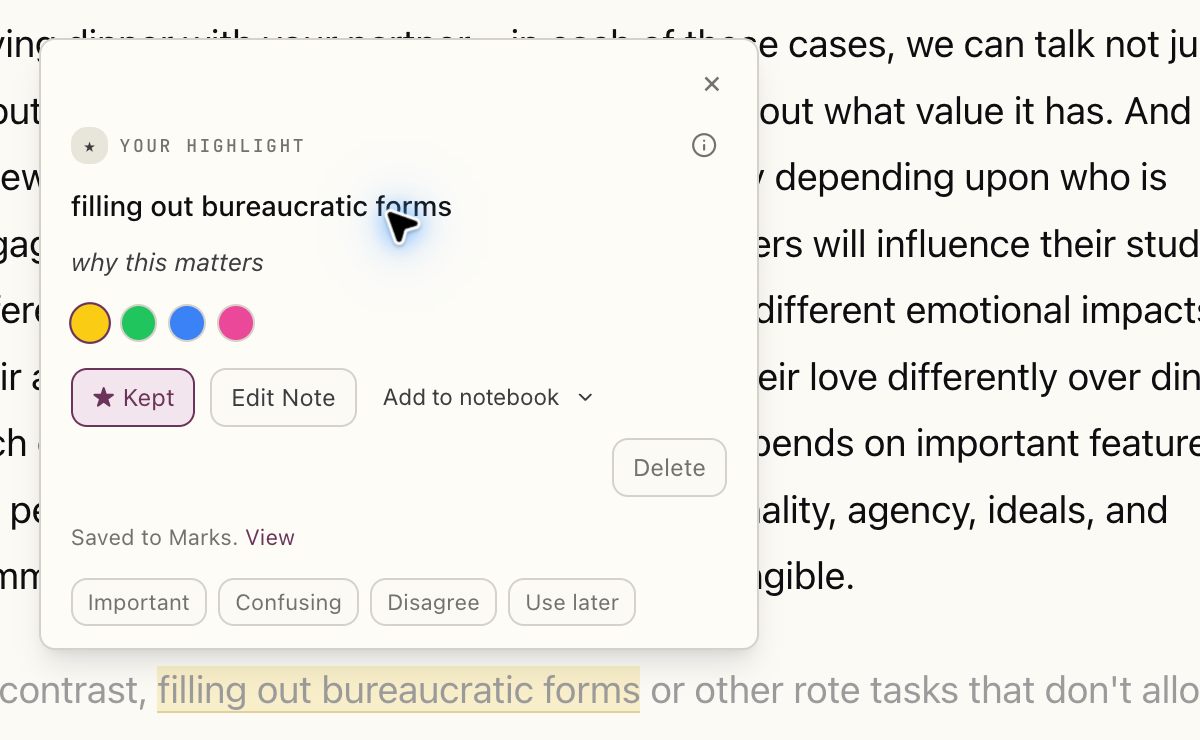
Select a passage, choose yellow, green, blue or pink, and write a note if you want to remember what it made you think. That mark is an extract with its source, anchored to its words and to the text on either side, so it stays on the right passage when the item is processed again.
You can give a kept mark one useful tag: Important, Confusing, Disagree or Use later. This is not a folder taxonomy that asks to be curated. It records why the line deserves another sitting. Your own highlights and any explanation marks the system provides remain separate through the All, Yours and System filters.
A short entry might be a paragraph from an essay, a note reading “Check the evidence before using this example,” and Use later. Weeks later the useful object is not only the sentence or your note. It is both of them, beside the exact paragraph that can answer your doubt.
Select the image to see the detail.
How do you capture extracts from what you actually read?
The Chrome and Firefox extensions save a page to your Library so that marking it has a home. On the iOS and Android apps, long-press a passage to highlight it. Marks made offline sync when the connection returns.
A PDF opens as a cleaned reading page, with a section map to help you find the argument. You highlight the extracted reading view, not the original PDF pages. Podcasts and YouTube talks open as transcripts, so the same select, note and return pattern works for words you heard. Everything stays alongside the other sources in your Library.
There is an honest plan difference. PDFs are read on paid plans and during the 30-day trial. On Free, a PDF retains its name and page count but does not become a readable page. Articles and transcripts can still hold your highlights. See plans and allowances before choosing how to bring your sources in.
30-day trial, no card required. Includes 600 comprehension units, 200 Ask voice minutes and 15 assistant answers a day.
A book can remain a book
You do not have to turn your shelves into uploads. If a Kindle export is how you collect book passages, a My Clippings.txt file or a Kindle app notebook can bring those highlights into your Library. A book with its marks is still a source, not a pile of unattributed sentences.
How do you come back without a feed?
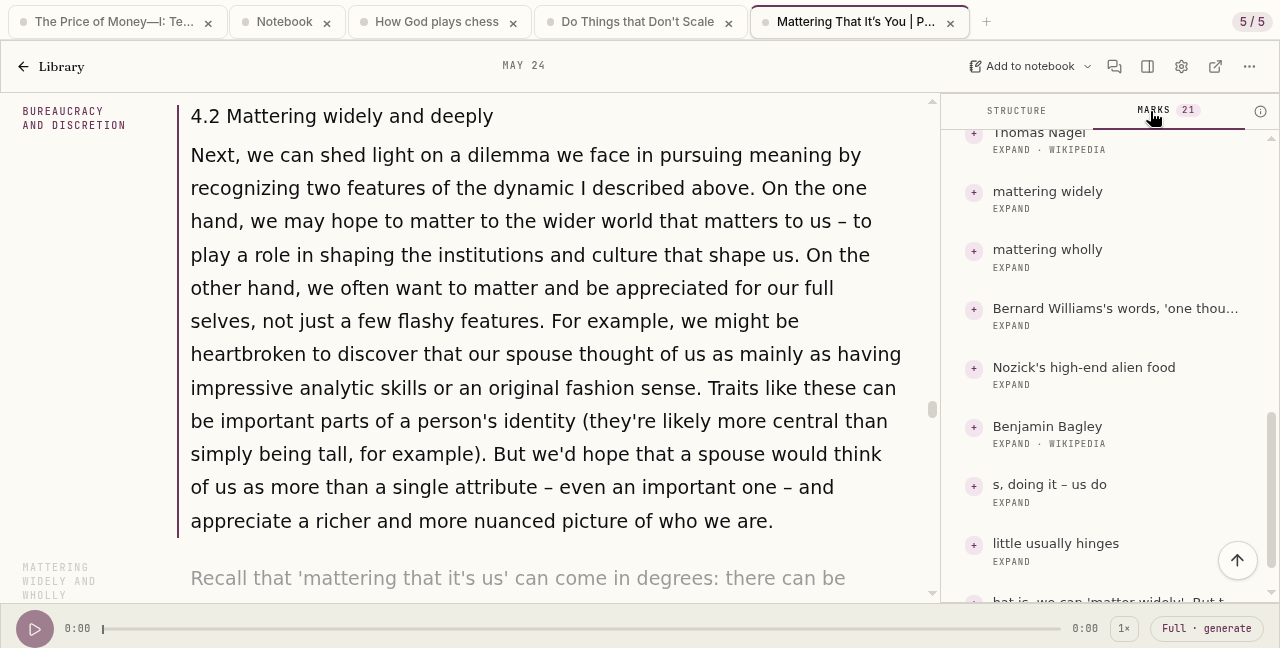
Start with the Marks rail beside the open piece. It lists the marks in the article, PDF or transcript you have open. Choose one and the reader takes you to its passage. There is no need to find it in a separate quote catalog.
Select the image to see the detail.
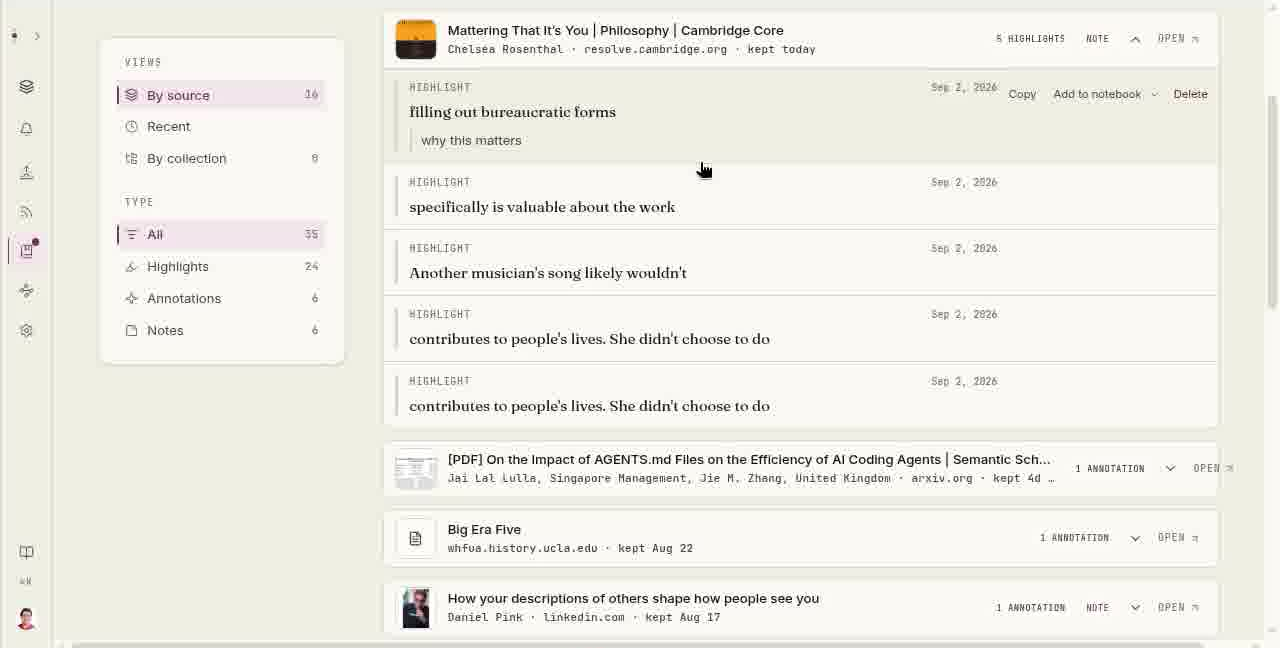
For a return across the whole Library, Marks gathers your highlights, annotations and notes by source. Filter to Highlights, Annotations or Notes, or search the highlighted words, your note or a source title. Select a mark to see its context, then Open article to land on that passage with the surrounding text in view. It briefly flashes so you can find your place.
Select the image to see the detail.
There is no streak to keep alive and no public audience for your marks. Choose which old passage deserves another read. Update a note when your thinking has changed. Returning to an article works the same quiet way, with the reason you saved it still on the page.
Our manifesto explains the commitment behind this: you choose what comes in, and the source stays within reach. It also says plainly that generated answers can be wrong and that you should be able to check them against the source. That caution belongs in the product, not in fine print.
How is this different from a notes vault or a quote app?
A general notes vault is good at putting ideas into containers you design. A dedicated quote tool can suit a collection of short lines you want to rotate through. Omphalis starts from a different object: the source you are still reading or listening to. The point of a mark is to bring you back there, not to turn its text into a detached card.
You can use that arrangement as a personal knowledge library or for personal knowledge management. Those are ways people use the workspace, not what we call the product. The Library keeps full sources and the Marks page keeps extracts attached to them, so your collection does not have to choose between organization and provenance.
When a few commonplace entries have become a genuine question, a notebook can hold the related sources and your working thoughts. Ask is optional at that stage. Its answers show where in your sources they came from; it does not search the web. Nothing about the mark-and-return habit requires you to ask anything. See how to revisit an unfinished question if that is the next step for you.
And you can export your notes and what you save on any plan, including the free one. A Settings Library export produces Markdown per item with marked passages. In Library, choose Manage then Export with Marks selected to include notes and tags as well. Your commonplace practice remains portable.
Questions about keeping a commonplace book here?
- What is a commonplace book app?
- It is a place to keep passages worth returning to, with enough of their sources to let you find the lines again. In Omphalis, that means articles, PDFs, podcast transcripts and YouTube talks in your Library, with your marks and notes on the passages that prompted them.
- How do you keep a commonplace book in Omphalis?
- Choose a source you want to spend time with. Mark a passage, add a note about why it stopped you, and tag it Important, Confusing, Disagree or Use later if that helps. Return through Marks and open the source to read the passage in context again.
- Can I save quotes from books and PDFs?
- Yes. Kindle highlights can be brought in from My Clippings.txt or a Kindle notebook export. A PDF opens as a cleaned reading page, and you highlight that page rather than the original PDF pages. PDFs are read on paid plans and during the 30-day trial; Free keeps a PDF with its name and page count but does not read it.
- Do highlighting, notes and tags work on Free?
- Yes. Highlighting, notes, tags and the Marks list are on every plan, including Free. You can also bring in a Kindle highlights file on Free. The plan limits concern processing particular source formats, not whether you can keep your own marks.
- Can I use a personal knowledge library?
- Yes, as one way of using the workspace rather than as a separate product category. Your Library keeps the sources. Marks keeps the passages and notes attached to them. A notebook can hold a few related sources and your working thoughts when a commonplace entry turns into work on a question.
- Do I need Ask to keep a commonplace book here?
- No. You can mark passages, add notes and return through Marks without asking a question. When you choose to ask across a notebook, answers show where in your sources they came from, and they draw on those sources rather than searching the web. The central habit stays yours: mark, reflect, reopen.
- Can I export my notes and marks?
- Yes. You can export your notes and what you save on any plan, including the free one. Settings exports the Library as Markdown per item with marked passages. In Library, Manage and then Export includes your marks with notes and tags when Marks is selected. There is no automatic sync to another notes app.
Start with one passage worth a second sitting.
Mark it where it lives, write why it stopped you, and keep the way back.
Start free
30-day trial, no card required. Includes 600 comprehension units, 200 Ask voice minutes and 15 assistant answers a day. After that, Free stays free. See plan allowances.
Read the digital commonplace book guide for templates and a weekly routine.
Written by Omphalis teamLast updated