Omphalis vs Eightify

Eightify helps you decide whether to watch. Omphalis helps you get through the talk you chose.

Eightify is a Chrome extension, with iOS and Android apps, that writes a summary of a YouTube video in one click: key insights you can tune, a timestamped summary for jumping to a topic, a top comments overview, and a transcript, in more than 40 languages. It works right in the YouTube tab, and it is quick. If the job is deciding in seconds whether a video is worth your time, stay with Eightify.

Omphalis starts after that decision. It opens a talk you already decided matters as a timestamped transcript you can read at your own pace, with a section map, explanations beside unfamiliar ideas, and marks and notes that bring you back to the exact moment. Omphalis runs on the web, on iOS and Android, and as a browser extension.

Start free

New accounts get a 30-day trial of every feature, no card needed. After that, Free stays free.

Disclosure: this comparison is written by Omphalis about its own product, so it is not a neutral review. We are not paid by Eightify or by anyone else to be compared favourably, this page carries no affiliate links, and every claim about Eightify is checked against their own public documentation. Read the full disclosures, and tell us if something here has gone out of date.

Checked September 29, 2026 against Eightify's homepage, Chrome Web Store listing, and transcript page. Our suggestions about fit are our judgment.

Start with the task you have in mind

Decide whether a video is worth watching

In Eightify

This is Eightify's home ground. Click the Eightify button on a YouTube video and it writes a summary with key insights in seconds, right in the YouTube tab. You can set the focus, format, and length of those insights, and a top comments overview shows whether other viewers found the video useful. Eightify pitches it as a way to clear your watch list, and it is built for that.

In Omphalis

Omphalis is not built for this job, and it does not try to judge a video for you. It starts after you have decided a talk matters: paste the YouTube link and the talk goes into your Library beside the articles, PDFs, and podcasts you already kept, ready when you are.

Find your way around a long talk or lecture

In Eightify

Eightify's timestamped summaries let you jump to a specific topic in the video, and its store listing says it handles videos up to 10 hours long. Navigation runs through the summary, which suits skipping straight to the part you came for.

In Omphalis

Omphalis opens the talk as a timestamped transcript with a section map beside it, so you can see the shape of a two-hour lecture and jump to a part while the speaker's full words stay on the page. When the creator declared chapters on YouTube, those appear as well; Omphalis never makes chapters up. For a diagram or a demonstration, return to the original video.

Understand the talk and come back to it

In Eightify

Eightify also gives you the transcript, which you can download as plain text or SRT, and it can translate summaries and transcripts into more than 40 languages. One click turns a summary into a shareable article. That is the right shape when you want to take the text elsewhere or send the key points to someone.

In Omphalis

Open an explanation beside an unfamiliar idea without leaving the transcript, or select your own phrase and choose Learn more. Highlight a passage and leave a note on it; the Marks rail and the Library Marks list reopen that exact moment later. Choose Listen to hear the transcript read aloud, and use Ask for questions about the talk, answered with citations you can follow back to the passage.

What working through a talk looks like

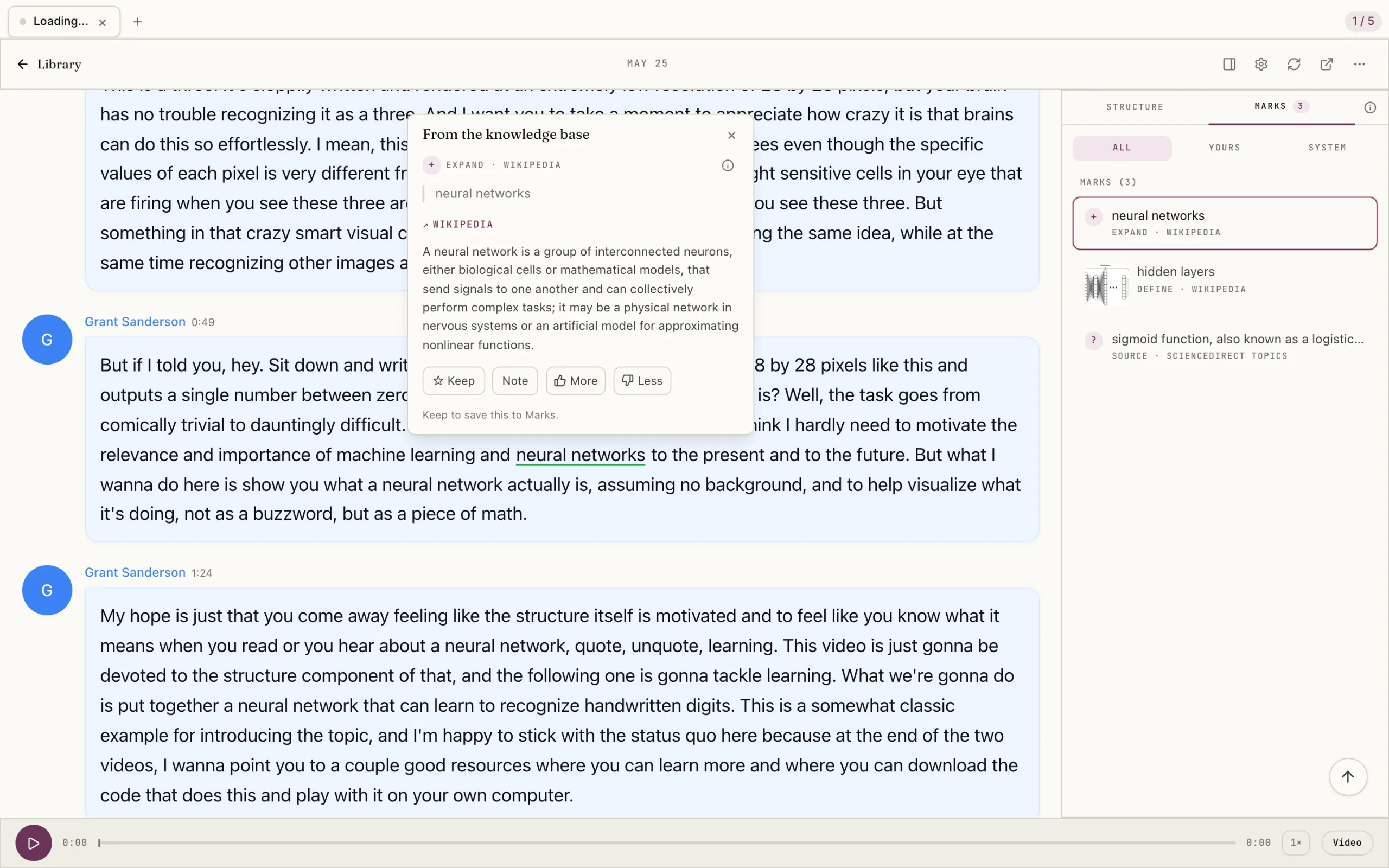
Eightify tells you what a video covers. This Omphalis example is the talk itself: a Grant Sanderson video opened as a timestamped transcript, with an explanation of neural networks open over the passage at 0:49 and the Marks panel listing the three marks on the page.

Grant Sanderson's neural networks video transcript with an explanation opened over a timestamped passage
A Grant Sanderson talk opened as a timestamped transcript, with an explanation of neural networks open over the passage and the Marks panel alongside.

Select the image to see the detail.

Which would I try?

Eightify, for deciding what to watch

Keep Eightify if most of your YouTube time goes into deciding: sorting a watch later list, checking what a video covers before you give it an hour, seeing what the comments say. It does that in one click on the YouTube page, and Omphalis is not trying to replace it.

Visit Eightify →

Omphalis, for the talk you already chose

Try Omphalis with one lecture or long talk you have already decided matters. Read it as a transcript, open an explanation where the speaker loses you, and leave a note on the moment you want back. If getting through the talk is the missing part, you will feel it within one video.

See the Omphalis reading workflow →

You can use both: Eightify to choose, Omphalis to work through what you chose. Open the same lecture in each and see which one leaves you understanding it.

Also compare Omphalis with Pocket, Omnivore, Instapaper, Matter, Glasp, Readwise, Heptabase, NotebookLM, Snipd, LiquidText, MarginNote, Elicit or Mindgrasp.
Before you choose

Is Omphalis an Eightify alternative?

For part of the job, yes: Omphalis is an alternative when you want to work through a YouTube talk you already chose, not when you want to decide in seconds whether to watch one. Eightify writes a summary of a video in one click, with key insights, timestamps, and a top comments overview, and that triage is its strength. Omphalis opens the talk as a timestamped transcript with a section map, explanations beside unfamiliar ideas, and marks and notes that reopen the moment later.

How can I read a YouTube video as text?

Open its transcript, which both tools give you. Eightify generates a transcript you can download as plain text or SRT. In Omphalis you paste a YouTube link and the talk opens as a timestamped transcript you read at your own pace, with explanations beside hard passages and highlights and notes that stay on the passage. Return to the original video for diagrams and demonstrations.

What tools outline long videos and lectures?

Eightify and Omphalis both help, in different ways. Eightify writes a timestamped summary of a YouTube video, a quick outline for deciding what to watch and jumping to a topic. Omphalis puts a section map beside the full transcript of a talk or lecture, so you can see its shape and jump to a part while the speaker's words stay on the page; podcasts, articles, and PDFs get the same map. When the creator declared chapters on YouTube, Omphalis shows them, and it never makes chapters up.

Can Omphalis tell me whether a video is worth watching?

Not the way Eightify does. Omphalis is built for the talk you have already chosen: it helps you get through the whole thing, with the speaker's words on the page. If triage of your watch list is the job, Eightify is the better fit.

How much do Eightify and Omphalis cost?

Eightify's transcript page describes a free plan with a set number of transcripts a month and a premium plan, and its Chrome Web Store listing offers a 7-day free trial of the extension; we did not find prices on Eightify's own pages. Omphalis has a Free plan, paid plans from $9 a month, and a 30-day trial with no card needed. Checked September 29, 2026.

Written by Last updated