PDF reading
Mark a confusing PDF passage, then return to it.
Upload a report or paper you saved because it mattered. When a paragraph will not yield, mark it in Omphalis, leave a short note about what is unclear, and come back later with the surrounding text still open.
The job is to finish that passage. A highlight with nothing attached only proves you were there.
Start free
30-day trial, no card required. Includes 600 comprehension units, 200 Ask voice minutes and 15 assistant answers a day. After that, Free stays free. See plan allowances.
See it on a real piece first →
Updated
Why can’t you explain a highlight when you reopen the PDF?
You stop on a methods paragraph, a defined term, or a caveat that limits the claim. You highlight the line, or you mean to. Days later the yellow mark is familiar and still unexplained. You remember that it was hard. You cannot say why.
A familiar mark with no reason attached is the usual failure of a bare highlight. The mark points at a sentence and withholds the question you had while the sentence was in front of you. Recognition comes back. The argument does not. If the pile of those marks is the problem you actually have, highlight review is a different job from finishing the PDF.
A useful return keeps three things together: the passage, the reason it stopped you, and enough of the surrounding text to check yourself. Returning to what you read starts there.
How do you mark a confusing PDF passage and return to it?
The loop is short. You are mid-read. A paragraph will not click. You mark that span, attach a one-line note (“what does this term do in this claim?”), and leave. When you reopen the file, you land on that mark with the source still visible, and you finish the passage on the page.
Keep the passage, not a stripped card
The mark is a door back into the PDF’s argument. An isolated quote can remind you of a phrase and still hide the sentence that qualifies it. Return inside the reading view, with the section map nearby, so the hard line stays in the claim it belongs to.
Attach the reason it stopped you
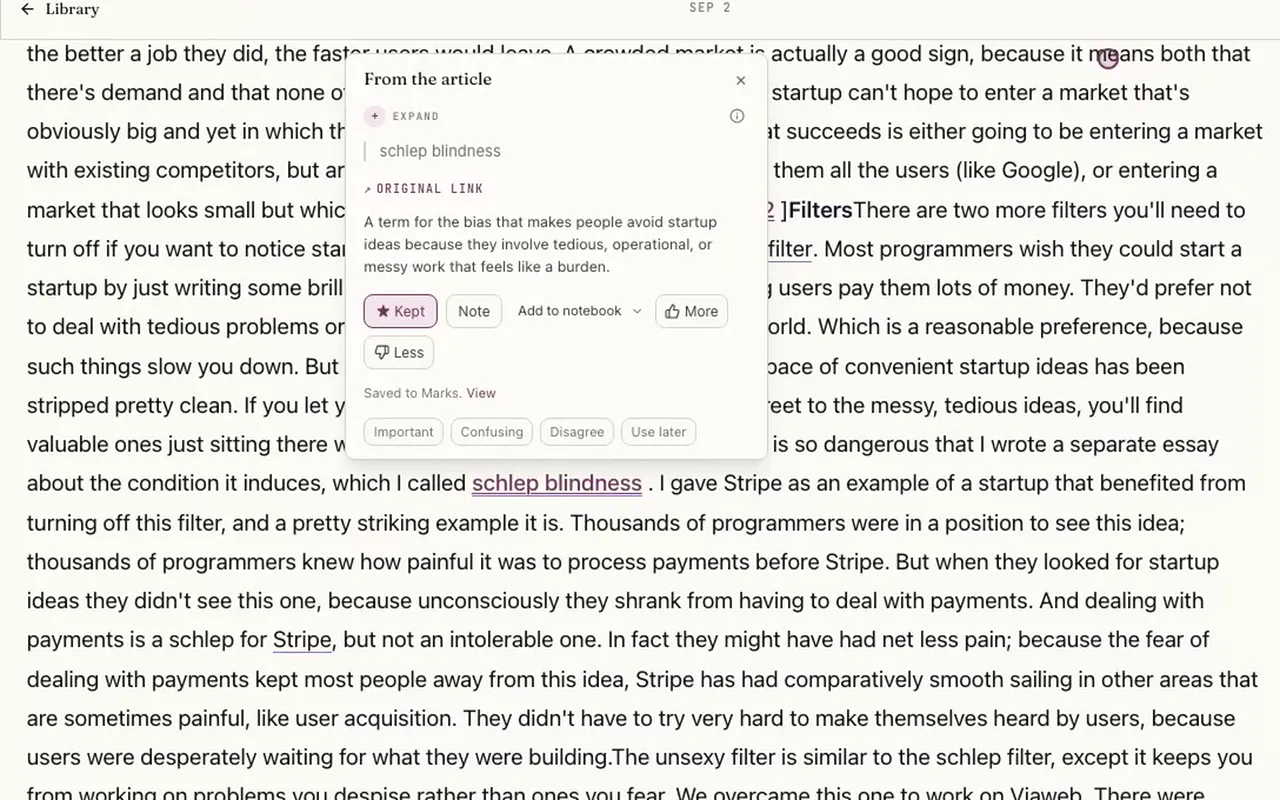
A one-line question beats a bare highlight. In the reader you can keep the passage, add a note, and tag it Confusing, Important, Disagree, or Use later. The card below is that mark on Paul Graham’s essay, the same actions you use on a PDF’s extracted text. Confusing is one of the tags, and the card confirms the passage was saved to Marks.
Select the image to see the detail.
How do you open an explanation without leaving the PDF?
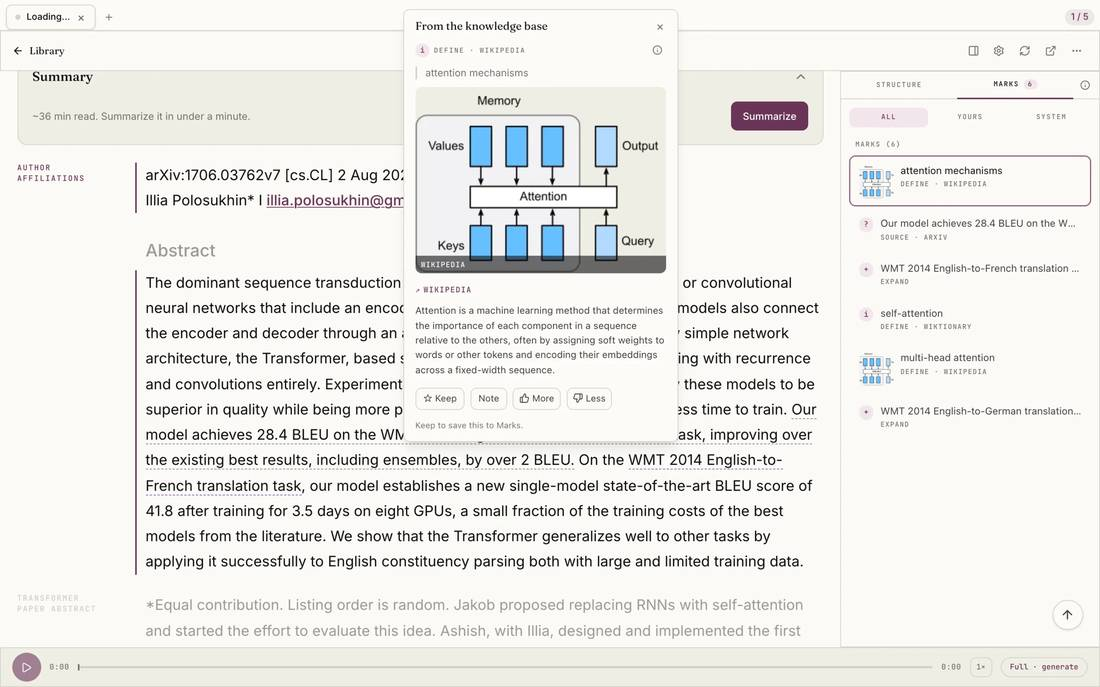
Some marks are questions you can answer by rereading the paragraph. Some are terms the paragraph assumes. On Attention Is All You Need, an explanation of attention mechanisms opens over the abstract, with the paper still on the page. You read the gloss alongside the author’s next sentences, and close it when you are ready to continue.
An explanation opened over a PDF is the same in-document help described on reading comprehension. The explanation sits beside the stuck spot and does not replace the section you still have to read. For a longer account of staying with the plot of a PDF, see how to read a PDF without losing the plot.
Select the image to see the detail.
What do PDF annotation tools already cover?
Plenty of tools already mark up a PDF. Adobe Acrobat is built for comments, drawing, and an assistant that answers questions about the file. LiquidText and MarginNote pull highlights into excerpt workspaces and cards that link back to the page. Zotero keeps annotations with the reference library. Commenting, collecting excerpts, and keeping a reference library are real jobs, and they are well served.
Omphalis is for a narrower loop: a confusing passage, a question left on the mark, and a return that still shows the source. Mark-and-return is the recurring work on dense PDFs you saved because they mattered, often alongside articles and talks in the same backlog.
When is a classic PDF annotator enough?
Use Acrobat, or the annotator you already trust, for legal redlines, handwritten notes, stamps, and collaborative review of a file whose layout is the work. Use LiquidText or MarginNote when you want passages gathered into an excerpt workspace or a card map. Use Zotero when the annotation has to live with the citation record. Pair them with a reader when you also need to finish the hard paragraphs. Stay with them when that markup is the whole job.
When do you need mark-and-return for understanding?
You need this when the PDF is a paper or a report you saved because it matters to the work, and a later pass still has to understand a fuzzy method, a definition, or a limit on the claim. Multi-pass reading is the normal case for researchers, analysts, founders, pastors, and writers with a backlog of sources. The mark has to survive the gap between sittings and still open onto the paragraph.
What does a practical mark-and-return loop look like?
Run this on one hard PDF, not on the whole backlog.
- Open the file in the reading view and use the section map to reach the part you actually need.
- Mark three confusing spots. On each one, write the question you would otherwise forget.
- Leave. The point of the mark is that you do not have to hold the question in your head.
- Return on the next sitting. Reopen one mark with the surrounding text in view.
- Resolve it on the page: reread the passage and its neighbors, open an explanation if the term is the blocker, and write a note in your own words.
One resolved mark is a finished piece of understanding. Three untouched highlights are a familiar page.
What does the PDF reading view keep together?
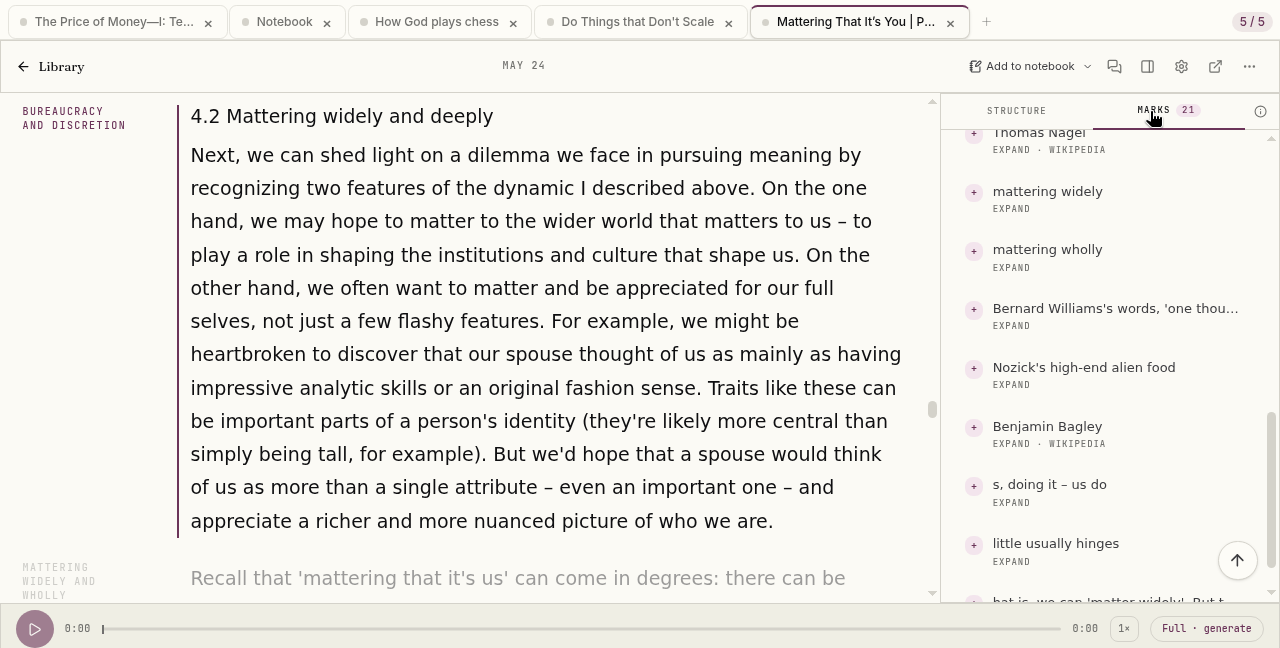
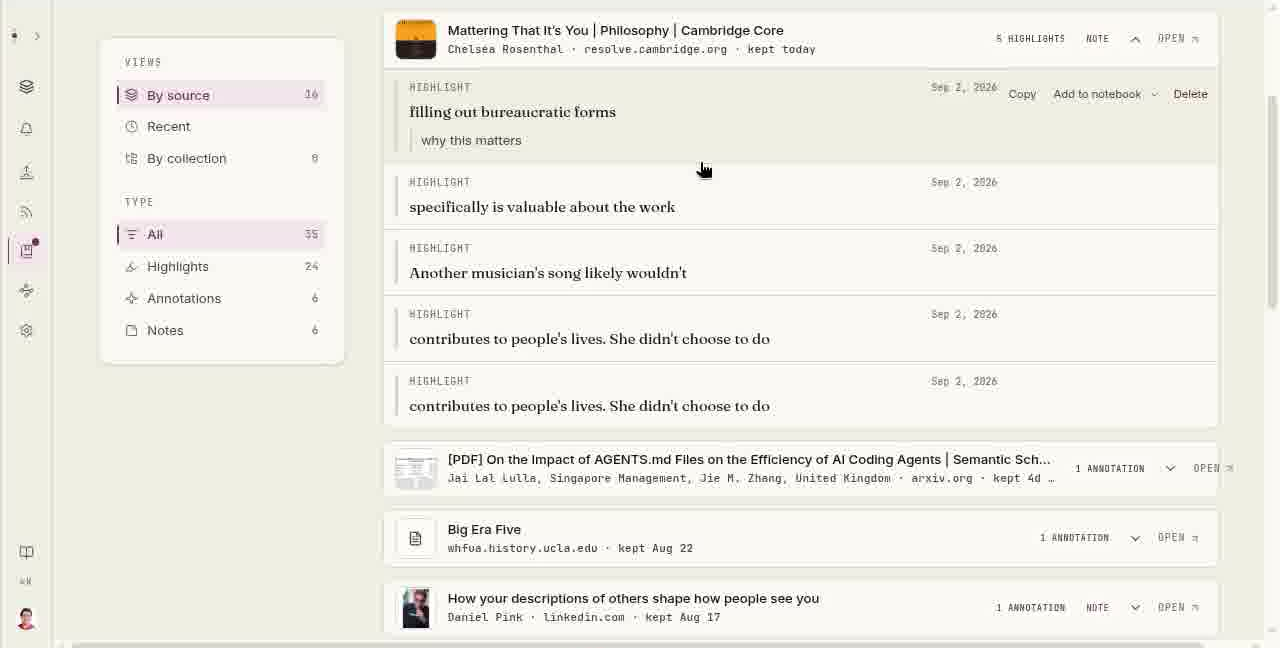
Upload the file; every plan above Free reads PDFs. Omphalis gives you a reading view of the extracted text and a section map so a long report has a way through it. Open an explanation on a term or passage while the document stays put. Keep a mark, add a note, and find that mark again from the Marks rail beside the reader or from the library, where each row has Open.
Keep the original PDF for figures, tables, and equations. Listen to the extracted text when you want narration, with the page still there to mark; listening to a PDF leaves the references and page numbers out. The same library holds the articles and talks you are working through alongside the paper, which is the usual shape of professional reading: more than one source, and a few passages that have to be finished.
Select the image to see the detail.
Select the image to see the detail.
Who is the PDF reading view for?
Professionals finishing dense PDFs they saved because the work depends on them: a paper to cite, a report to brief, a long piece to teach or argue from. If you want the stance behind that, the case for comprehension is the longer version. Notebook-wide questions across many uploads are a different tool; NotebookLM is built for that study set. For one PDF, one article, or one episode, see the NotebookLM alternative.
Who should keep Acrobat, LiquidText, MarginNote, or Zotero?
People whose job is visual markup, excerpt cards, or a Zotero-centered literature review. Omphalis does not replace those. Use it for the finish-and-understand return, and keep the annotator when the ink, the workspace, or the reference record is what the task requires.
What else should you know about reading a PDF in Omphalis?
- How do you mark confusing PDF passages so you can return later?
- When a paragraph will not yield, mark it in place and leave a short note about what is unclear. Tag it Confusing if that is the reason it stopped you. Leave the document, then reopen at that mark with the surrounding text still visible. Omphalis keeps those marks and explanations beside the cleaned PDF reading view, so the return is a door back into the argument.
- What is better than highlighting a hard PDF line and hoping you remember it?
- Keep the passage, the reason it stopped you, and a way to reopen it days later. A bare highlight shows you that a line once mattered. A mark with a note lets you resolve the hard part on the next pass, with the sentences around it still in view.
- When should you use Omphalis instead of only Acrobat, LiquidText, MarginNote, or Zotero?
- Stay with a classic PDF annotator when the job is visual markup, an excerpt workspace, or cards inside a reference library. Use Omphalis when the remaining work is returning to confusing passages in dense PDFs you saved because they mattered, and finishing them beside the source.
- Will it look exactly like the original PDF?
- The reader presents extracted text in a reading view, with a section map for moving through a long file. Keep the original PDF available to check tables, figures, equations, and any layout that carries meaning. A scan that does not extract cleanly is a reason to keep that original open, not a reason to trust a loose paraphrase of the page.
- Can I come back weeks later?
- Yes. Highlights and notes stay attached to their passages. The Marks rail lists them beside the open document, and in the library Marks list, selecting a mark shows it in context, with Open article to return to that passage in the source.
- Which plans read PDFs, and how big can one be?
- Every plan above Free, including the 30-day trial, reads PDFs, and the work comes out of your monthly units. On Free a PDF is kept with its name and page count but not read. PDF, EPUB and Word files can be up to 90 MB on current plans. Before work starts the document is quoted from its real page count, you pay at most the quote, and if it does not fit your units you can choose which pages to read.
- Can I see who wrote the paper?
- Click an author's name to see a short bio, affiliation and photo, with Not this person to correct a wrong match. A profile can be missing or mistaken, so treat it as a suggestion. Looking up a profile does not use your units.
- Can I listen to a PDF?
- Yes. Choose Listen for natural-voice narration prepared for spoken delivery from the extracted text. The page stays available, so you can mark a passage and return to it.
Start with the PDF you need to finish.
Mark one confusing passage, leave the question beside it, and come back with the source still in view.
Start free
30-day trial, no card required. Includes 600 comprehension units, 200 Ask voice minutes and 15 assistant answers a day. After that, Free stays free. See plan allowances.
Written by Omphalis teamLast updated