Heptabase or Omphalis for your next reading project?
You have a paper to work through and notes you want to connect. Heptabase gives you cards and whiteboards to arrange that material. Omphalis keeps explanations, questions and notes beside the source as you read.
Both help you work with sources. The choice depends on how you like to read and develop an idea.
30-day trial, no card required. Includes 600 comprehension units, 200 Ask voice minutes and 15 assistant answers a day. After that, Free stays free. See plan allowances.
Disclosure: this comparison is written by Omphalis about its own product, so it is not a neutral review. We are not paid by Heptabase or by anyone else to be compared favourably, this page carries no affiliate links, and every claim about Heptabase is checked against their own public documentation. Read the full disclosures, and tell us if something here has gone out of date.
Checked against official documentation on September 5, 2026. Our suggestions about fit are our judgment.
Updated
How do Heptabase and Omphalis compare?
Heptabase and Omphalis compared on sources, notes, returning and pricing
Compared on
Heptabase
Omphalis
Sources supported
PDFs, read and highlighted in their page layout, alongside your cards and notes. Unlimited PDF uploads and parsing come with Premium.
Papers, articles and other sources, read as extracted text with sections to navigate by.
Highlights and notes
Selected passages become Highlight cards, which you arrange on whiteboards and link to other notes.
A note stays attached to the passage that prompted it, and related sources and notes can share a notebook.
Returning to a passage
Space search finds relevant cards and whiteboards.
From a notebook, return to the source to check something, and follow the citations in an answer back to the passage.
Pricing model
No free plan; the trial lasts up to 7 days or until the trial credits run out. Pro is $8.99 a month billed yearly or $11.99 month to month, and Premium $17.99 a month billed yearly or $23.99 month to month. Prices checked September 24, 2026.
Free plan with no card needed, and paid plans from $9 a month, each including PDF reading.
Start with the task you have in mind
Work through a paper
In Heptabase
Read and highlight a PDF in its page layout. Selected passages become Highlight cards. You can also ask questions about a chosen range of pages.
Read the extracted text with sections to navigate by. Open an explanation beside a difficult passage, select a phrase with Learn more, or listen to a narrated version of the source.
Connect sources and your own notes
In Heptabase
Arrange cards on whiteboards and link notes to one another. The spatial layout gives you a way to work out how ideas belong together.
Keep a note attached to the passage that prompted it. Bring related sources and your own notes into a notebook, then return to the source when you want to check something.
Ask a question
In Heptabase
Add sources to a conversation, or use Space search to find relevant cards and whiteboards. The conversation can read those results to answer your question.
Ask about the source you are reading, typed or out loud in the web app, and follow up while it stays in view. In a notebook, ask about the sources gathered there and follow the citations to the passages the answer drew on.
What happens when a passage makes you stop?
In this Omphalis example, an explanation opens beside the essay. You can read the extra context, then continue from the same place.
Open an explanation, read it beside the passage, then carry on.
Keep the related reading together
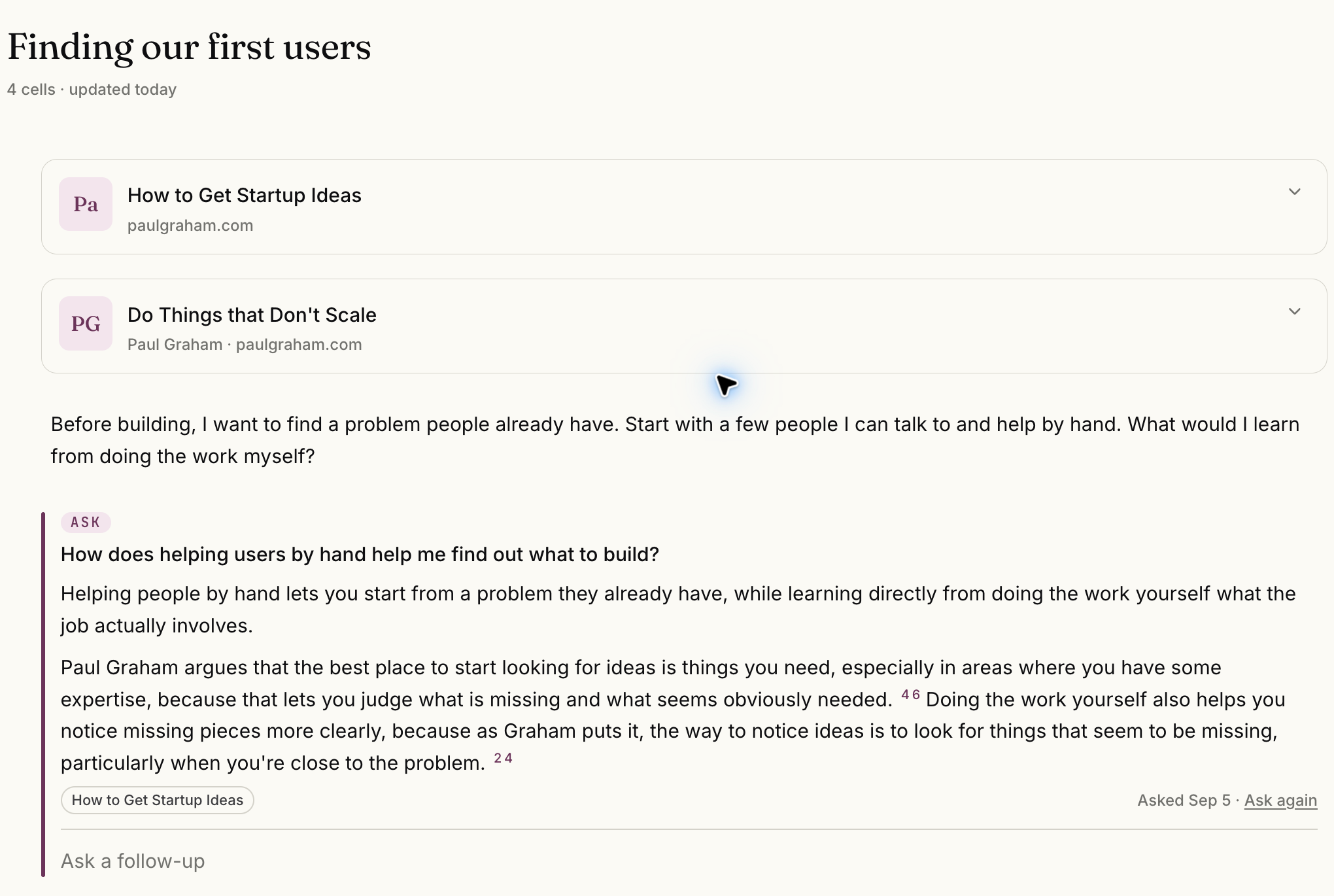
This Omphalis notebook holds two essays and a note about finding first users. The answer shown cites the essay on startup ideas, down to the passage it drew on.
Finding our first users brings two Paul Graham essays and a note together. The answer shown cites the startup ideas essay.
Select the image to see the detail.
Which would I try?
Heptabase, for thinking on a whiteboard
If moving notes around helps you understand a topic, try its cards and whiteboards. Heptabase also documents offline access to notes and files, and real-time collaboration. Offline access and collaboration are worth considering if you work offline or develop ideas with someone else.
If the hard part is getting through a source with your questions answered, try a piece in Omphalis. Read the cleaned text, open an explanation, leave your own note and try the narration. Use a notebook when you have related material to bring together.
Start with one source you know. Work through a difficult passage, leave a note, then come back to it. See which tool makes that process useful for you.
Heptabase has no free plan. The Heptabase trial lasts up to 7 days or until the trial credits run out. Pro costs $8.99 a month billed yearly ($107.88) or $11.99 month to month, and Premium, which adds unlimited PDF uploads and parsing, costs $17.99 a month billed yearly ($215.88) or $23.99 month to month. Omphalis has a Free plan with no card needed, and paid plans start at $9 a month, each including PDF reading. Prices checked September 24, 2026.
What does Heptabase do that Omphalis does not?
Spatial work. Heptabase lets you arrange cards on whiteboards to see how ideas relate, and Omphalis has no whiteboard or card canvas. If laying ideas out in space is how you come to understand them, Heptabase is the better fit.
Can I move my Heptabase notes into Omphalis?
There is no Heptabase importer. If you keep Heptabase for whiteboards you have already built, you do not need to move them. Bring the papers and articles you are still working through into Omphalis, and keep your notes beside those passages from then on.