Ask your reading
Ask a question about what you read.
Open Ask when you want to test your understanding or find an idea again. Answers draw on your saved sources and include citations you can follow back to the reading.
Press ⌘ Shift K anywhere to open it, or Ctrl Shift K on Windows and Linux. Inside the question, type @ to pull in a particular item or notebook, a Space, a Collection, or the Omphalis guide, and / for the commands that change what Ask is looking at. Ask keeps a separate thread for each item and Space, so a question about one piece does not drift into another.
Start free
30-day trial, no card required. Includes 600 comprehension units, 200 Ask voice minutes and 15 assistant answers a day. After that, Free stays free. See plan allowances.
See it on a real piece first →
Or ask out loud with Ask voice →
Updated
How do you ask a question in your own words?
While reading Chelsea Rosenthal’s Mattering That It’s You, we asked: “Why can work be useful without feeling meaningful?” The answer explains the distinction in the article and includes numbered citations. Open those passages to judge how well the answer fits.
How do you keep a question with the sources you are working on?
A notebook can hold source cards, your own notes, and an Ask answer. This demonstration brings together two Paul Graham essays and a working question about helping early users by hand. The displayed answer cites How to Get Startup Ideas. When the question is how several sources fit together, investigate a topic across them.
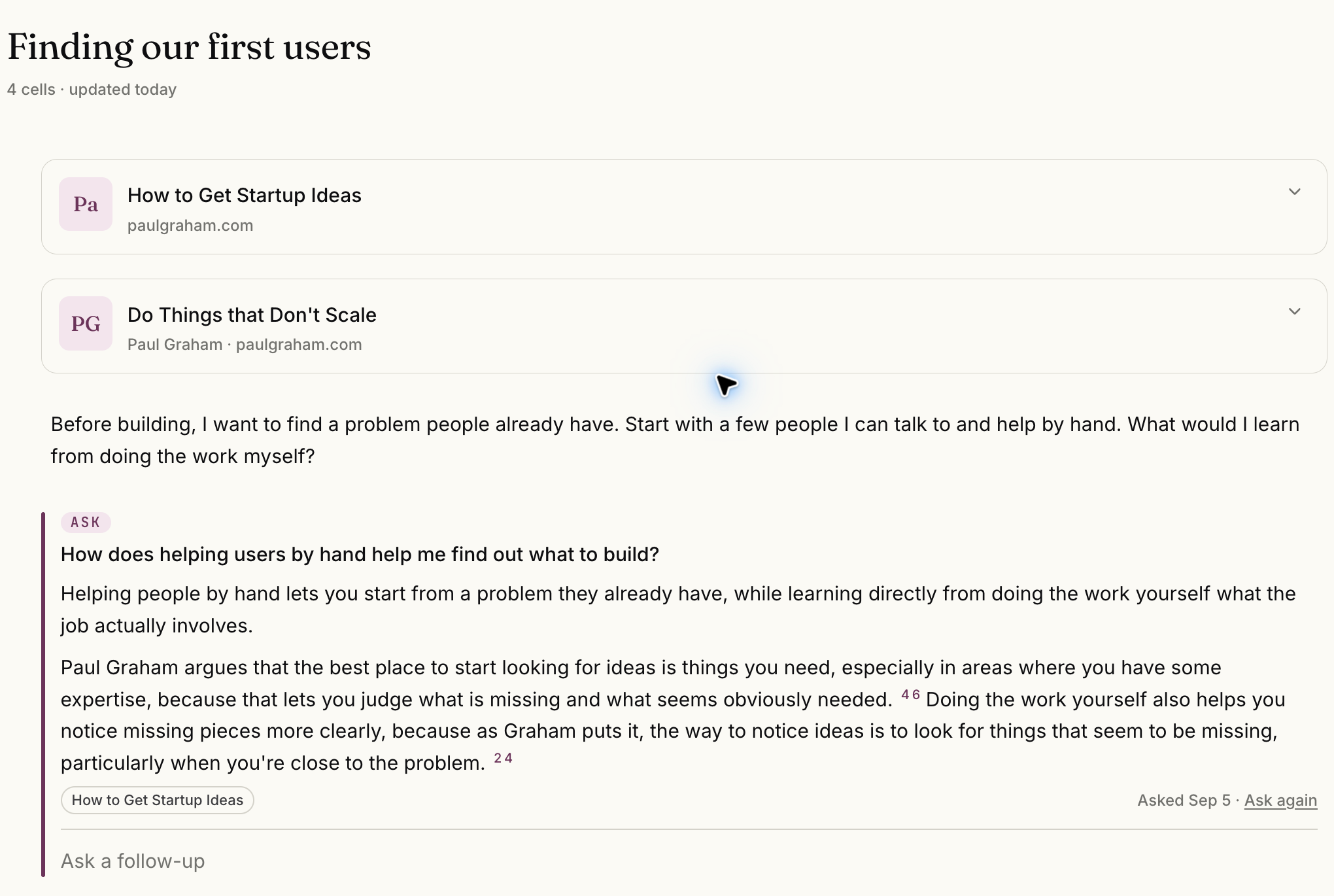
Select the image to see the detail.
Where does a citation take you?
Choose a numbered source and the reader scrolls to the exact passage, table row or spoken moment and flashes it. In a podcast or video transcript, it plays from there. When the passage cannot be found, the reader says so instead of doing nothing.
On a wide window Ask opens beside the page, which stays live, so you can keep reading, playing or marking while you ask. On a narrow window it opens as a sheet over the page.
Ask works on every plan, with limits. Free answers from the current item or Space by keyword, shows up to 3 sources per answer and allows 5 answers a day. Searching All Spaces and searching by meaning are on every plan above Free, including the 30-day trial.
What else should you know about Ask?
- Can I ask questions about my PDFs and articles?
- Yes. Ask works with saved material, including PDFs, articles, notes, and transcripts. Each answer cites the passages it came from, so you can follow any point back to its source.
- Can I ask while I am reading one source?
- Yes. Open Ask from the reader to work through a question about the piece in front of you. The example on this page uses one article.
- What does Ask do on the Free plan?
- Free answers from the current item or Space by keyword, shows up to 3 sources per answer and allows 5 answers a day. Searching All Spaces and searching by meaning are on every plan above Free, including the 30-day trial. The daily limit is 15 on the trial, 50 on Pro, 200 on Premium and unlimited on Scholar.
- Can I keep an answer in a notebook?
- Yes. A notebook can contain saved sources, your own notes, and Ask answers, so the question stays with the material you were working on.
Start with a source and a question.
Read the answer, open its citations, and keep the parts that help you think.
Start free
30-day trial, no card required. Includes 600 comprehension units, 200 Ask voice minutes and 15 assistant answers a day. After that, Free stays free. See plan allowances.
Written by Omphalis teamLast updated