Podcasts worth keeping
Understand the episode. Keep what matters.
A good conversation leaves you with more than a finished episode. Bring it into Omphalis, unpack the idea you didn’t quite follow, ask a question out loud, and keep your own note beside the words that made you stop and think.
30-day trial, no card required. Includes 600 comprehension units, 200 Ask voice minutes and 15 assistant answers a day. After that, Free stays free. See plan allowances.
Email me a preview of my episode →
Updated
What would you like to take from this episode?
Bring an episode
Paste its link into Library. Once the transcript is ready, timestamps, speaker labels and the section map help you find the part you want to revisit.
Work out what it means
Open an explanation of a name or idea, or select a phrase and choose Learn more. Ask about this opens a conversation with the episode in view.
Keep your take on it
Highlight the passage and add why it matters to you. Later, search Marks for your note or the words you remember and open the passage again.
Start with a public episode link that Omphalis can resolve. Transcription and further processing use your plan’s allowance. Listen narration reads the transcript aloud.
How do you keep a moment while listening?
While an episode plays, press Highlight now, or Alt+Shift+H, and Omphalis saves the passage around that moment as a private highlight. It does not pause the audio and does not use units. If the transcript has no usable timing at that point, it saves a timestamp bookmark instead.
Moments suggests passages from the whole episode. They stay private until you keep them, and you can adjust, dismiss or keep each one. A full scan of an episode uses units, and shows a quote first.
You can publish up to 50 kept highlights as a public episode page that plays only those passages. Anyone with the link can open it, and search engines may list it. Removing the share removes the page, not a copy someone already saved or a search engine’s cached copy.
Highlight now, Moments and episode pages are on every plan. They need a ready transcript and work in the web app and mobile web, not in the native iPhone and Android apps. Headphone button capture is not available.
What does that reference mean?
At 4:26 in Huberman Lab’s “Essentials: Understand & Improve Memory Using Science-Based Tools”, Andrew Huberman mentions James McGaugh and Larry Cahill. Open the explanation beside their names, see who the researchers are, then go back to the claim in the conversation.
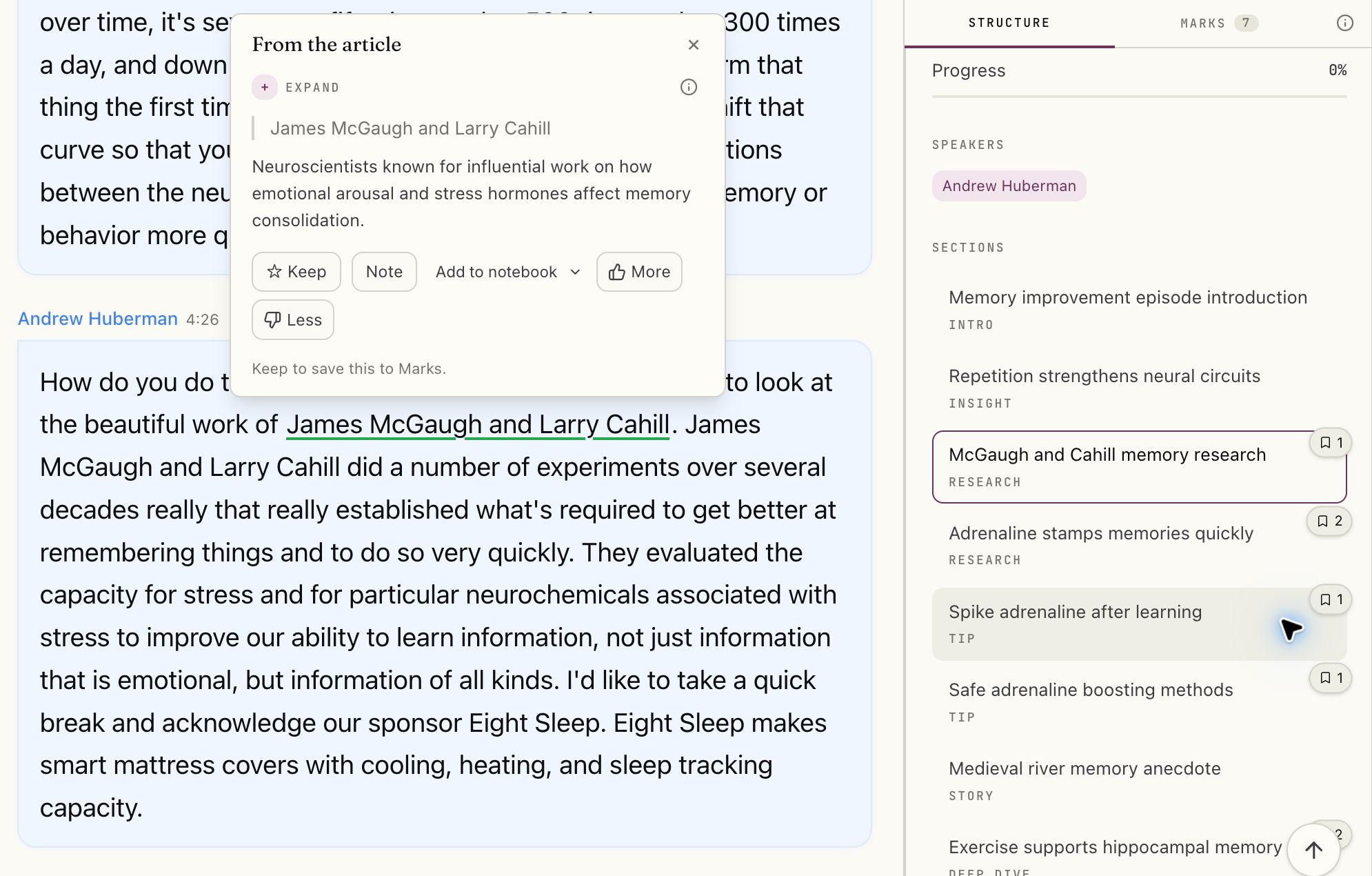
Select the image to see the detail.
See the original Huberman Lab episode and show notes →
Who is speaking?
In the web reader, a host or guest with a confirmed profile has a bio card on their avatar or speaker chip: a short introduction, affiliation and a profile link. Check that link for context. Cards appear on episodes transcribed after late September, and earlier episodes keep their old speaker labels. If the match is wrong, choose Not this person.
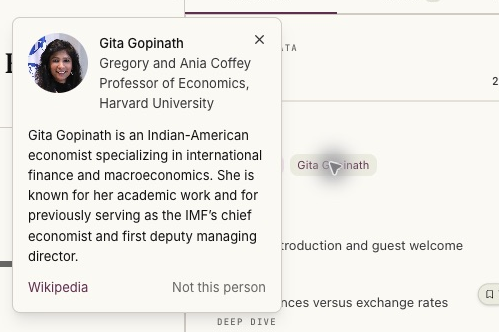
Original episode and transcript. Headshot: Presse- und Informationsamt, Vaduz (Roland Korner). Photo source and reuse terms. Screenshot cropped for detail.
.jpg)
Whose notes am I looking at?
Show Notes come from the publisher. Generate Summary gives you Omphalis’s overview of the transcript. Your personal notes stay on the passages you mark. Use the overview to find a way into the episode, and the transcript to check what was actually said.
A conversation about the conversation
What would you ask if you could join the conversation?
Open Ask about this, choose Current item to stay with this episode, and press Talk. Ask answers aloud from the saved transcript and puts numbered sources on screen. Open a source to inspect the passage. Ask a follow-up, interrupt an answer, or switch to typing as the idea gets clearer.
Voice is currently English in the browser web app, on Pro, Premium, Scholar and the trial, within your voice allowance. Sessions last up to 20 minutes. Ask is designed to flag when the selected sources do not cover a question; answers can still be wrong, so check the cited passage.
See the same Ask voice flow on a saved essay, Emerson’s “The American Scholar”. This existing demo is not a podcast conversation. The questions use a synthetic voice and the video adds music; the answers and screen are Omphalis as it ran.
How do you find the idea again?
Keep a note about the point you want to use. Search for your own words in Marks, then reopen the passage to check what the speaker actually said. Your highlights and notes stay attached to the episode. Leave the reader, open Library’s Marks list, and search your note, the highlighted words or the source title. Open the passage to inspect the surrounding discussion before using the idea.
The episode can sit beside your articles, PDFs and YouTube talks. If you want to compare what they say, deliberately widen Ask to Current Space or All Spaces. Its sources show which saved piece each answer draws on. PDF processing and All Spaces require a paid plan or the trial.
How highlights and notes work →Compare Omphalis and Snipd →NotebookLM alternative →
How does bringing an episode work?
- How do I bring a podcast into Omphalis?
- Paste an episode link into the Library save dialog. Omphalis supports direct audio links and supported episode pages, including Apple Podcasts and Spotify links that resolve to a public episode in the show's feed. Public Substack podcast episodes, and the audio of video episodes, save as podcast episodes with a transcript; paid-subscriber episodes and video with no audio open on Substack instead. Not every link can be resolved. A transcript must be ready before you can work through the episode's words; transcription uses your processing allowance.
- Are podcast notes written by the host, Omphalis, or me?
- Show Notes are the publisher's episode description, when supplied. Summary is generated by Omphalis from the episode transcript. Your own notes are the thoughts you attach to highlighted passages or kept explanations. These are separate, so you can tell the source's description from an overview and from your own thinking.
- Can I ask a voice question about just this episode?
- Yes. Open Ask about this in the episode reader, choose Current item, then press Talk. Ask answers aloud and shows numbered sources you can open in the transcript. You can follow up or switch to typing. Voice currently works in English in the browser web app, with sessions up to 20 minutes and a voice allowance on Pro, Premium, Scholar and the 30-day trial. Free includes limited typed Ask, but no voice minutes.
- Can I see who the host or guest is?
- When a named speaker has a confirmed profile, their avatar or speaker chip opens a short bio, affiliation and a profile link in the web reader. A speaker can be the host or a guest; these are profiles of the people speaking, not a claim that they authored the episode. Cards appear on episodes transcribed after late September, and only for a speaker Omphalis can name in full; episodes transcribed earlier keep their old speaker labels. Profiles can be unavailable or mistaken. Use Not this person to hide a wrong match.
- Does Listen play the original episode?
- The Listen narration feature reads the saved transcript aloud. It is not a promise of the original hosts' recording. You can keep listening in your usual podcast app and use Omphalis to understand, question and revisit the episode. See the Listen page for narration and mobile availability.
- Can I share the highlights from an episode?
- Yes. Pick up to 50 kept highlights, preview the page and publish a public episode page whose own player plays only those passages. Anyone with the link can open it, and search engines may list it. Removing the share removes the page, not a copy someone already saved. It works on every plan, from the web app and mobile web, and some sources cannot be shared, such as paid-subscriber audio.
- Can I find my notes again after the trial?
- Highlights and your own notes are available on every plan, including Free. Open Marks in the Library, search by the words you highlighted, your note or the source title, and select a mark to see its context. Open takes you back to the passage. New processing, narration and Ask have plan allowances; the pricing page explains them.
Try one episode for something you already want to do.
Choose a familiar episode and one thing you want to get from it. Work through the relevant passage, leave a note if it helps, and check the result against the source.
An account is needed to use your own episode.
30-day trial, no card required. Includes 600 comprehension units, 200 Ask voice minutes and 15 assistant answers a day. After that, Free stays free. See plan allowances.
The sample uses prepared transcript passages, explanations and sample marks. It does not save your own notes for a later return.
Written by Omphalis teamLast updated