Elicit searches and screens the literature. Omphalis helps you read the papers you keep.
Elicit is a research assistant for the academic literature. Elicit searches more than 138 million papers by meaning rather than exact keywords, backs the claims it generates with sentence-level citations, extracts data from many papers into a table, and supports systematic reviews from screening and extraction through to a cited report. Search, extraction and cited reviews are real strengths. If the job is finding papers you have not read yet, or screening and extracting across dozens of them, stay with Elicit.
Omphalis does not search the academic literature. Omphalis is for the reading that comes after: a paper you chose to keep opens as a cleaned reading page with a section map, explanations open beside a hard passage, your marks and notes reopen that passage later, and Ask answers with citations back to passages in your own library. The same library holds the articles, podcasts, and talks you are working through. Many researchers would use both.
30-day trial, no card required. Includes 200 voice minutes, 200 PDF pages and 15 assistant answers a day. After that, Free stays free. See plan allowances.
Disclosure: this comparison is written by Omphalis about its own product, so it is not a neutral review. We are not paid by Elicit or by anyone else to be compared favourably, this page carries no affiliate links, and every claim about Elicit is checked against their own public documentation. Read the full disclosures, and tell us if something here has gone out of date.
Elicit and Omphalis compared on sources, notes, returning and pricing
Compared on
Elicit
Omphalis
Sources supported
More than 138 million academic papers from Semantic Scholar, PubMed and OpenAlex, over 545,000 clinical trials, and PDFs you upload.
Papers you upload, in the same Library as your articles, podcasts and talks. Omphalis has no literature search.
Highlights and notes
A Library of PDFs and references imported from Zotero, EndNote or Mendeley, organized with collections and tags, plus data extracted into tables.
Highlights and notes stay attached to the passage, with a tag such as Confusing for what stopped you.
Returning to a passage
Answers about up to 4 saved papers at once on Basic and 8 on paid plans, with a sentence-level citation behind each generated claim.
The Marks rail and the Library Marks list reopen the passage, and Ask answers with citations back to it.
Pricing model
A free Basic plan with unlimited paper search, and paid Pro, Scale and Enterprise plans. See Elicit's pricing for current prices.
Free plan, and paid plans from $9 a month, with a 30-day trial, no card required (200 voice minutes, 200 PDF pages and 15 assistant answers a day). PDFs are read on paid plans and during the trial.
Start with the task you have in mind
Find papers you have not read yet
In Elicit
Finding papers is Elicit's core job. Elicit searches more than 138 million academic papers drawn from Semantic Scholar, PubMed, and OpenAlex, plus over 545,000 clinical trials, and its semantic search finds relevant papers even when they do not share your keywords. A search that proved useful can become an alert for new research. The free Basic plan includes unlimited paper search.
Omphalis does not search the academic literature, and it cannot find papers you have not seen. Do the search in Elicit or the database you trust. Omphalis starts when you upload a paper you chose to keep, and that paper sits in the same library as the articles, podcasts, and talks you saved.
Screen and extract across dozens of papers
In Elicit
Elicit's systematic review workflow combines searches across PubMed, ClinicalTrials.gov, and its own corpus, suggests screening criteria you can accept, edit, or add to, and extracts data with each value supported by a quote or figure from the source. The workflow ends in a report with sentence-level citations. Elicit's help center lists the Extract Data tool, which builds a table from up to 50 papers you upload as PDFs or pick from your library, for Pro, Scale, and Enterprise subscribers.
Omphalis has no screening workflow and no extraction table, so keep the review in Elicit. Omphalis helps with the paper that made it through the screen and still has to be understood: open it in the reader, use the section map to reach the methods or the limitations, and leave a note on the passage you want to question.
Read one paper closely and return to it
In Elicit
Elicit can answer questions about papers you upload or have saved, up to 4 at once on the Basic plan and 8 on paid plans. Elicit's Library stores PDFs and references imported from Zotero, EndNote, or Mendeley, organized with collections and tags. Elicit says it backs every generated claim with a sentence-level citation to the underlying source.
The paper opens as a cleaned reading page with a section map, so you can see the shape of a long paper and jump to a part. Open an explanation beside a hard term, or select your own phrase and choose Learn more. Keep a highlight or a note on the passage, tag it Confusing if that is why it stopped you, and reopen it later from the Marks rail or the library Marks list. Ask answers with citations back to the passage, and Listen reads the paper aloud.
One paper, read in place
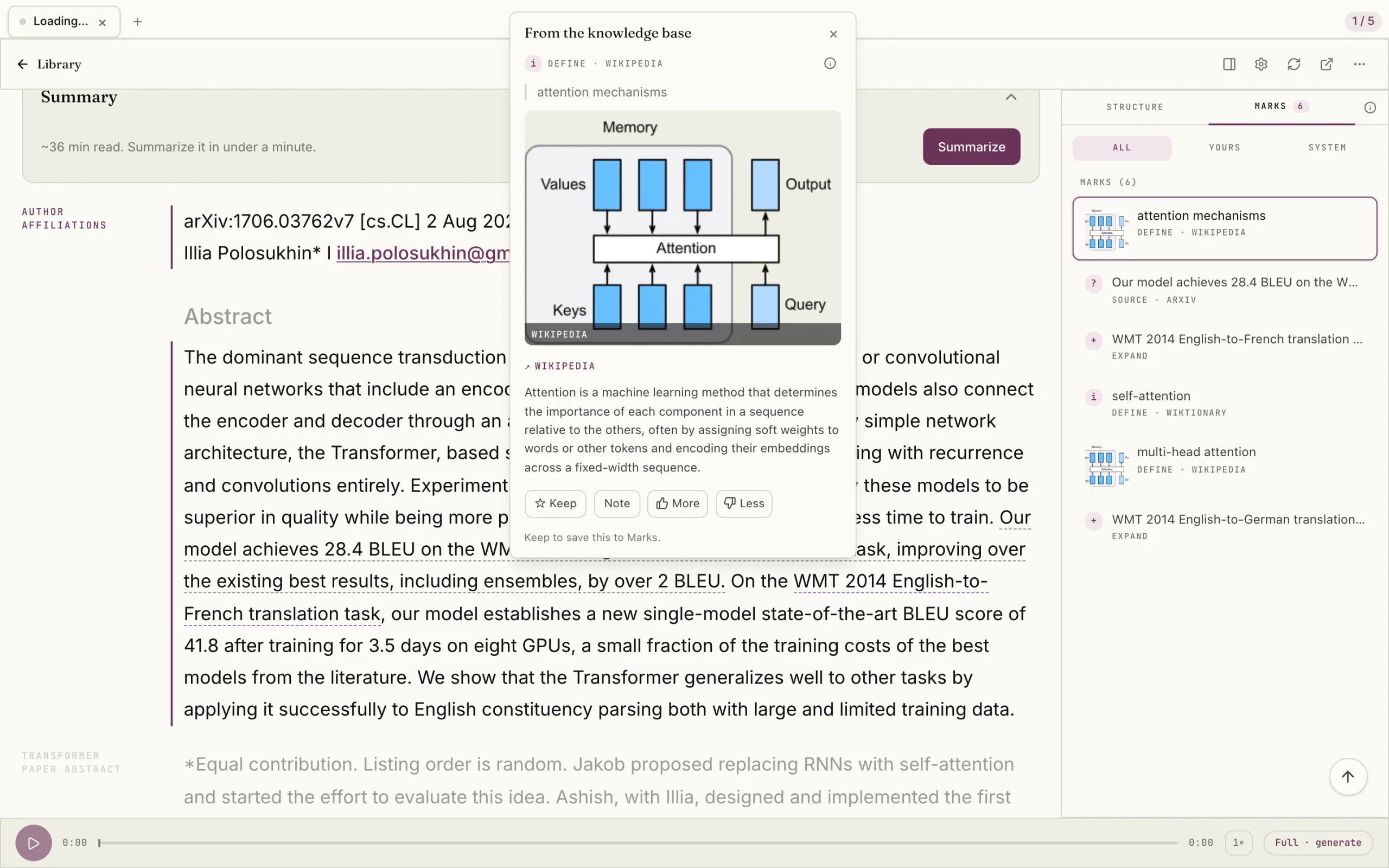
Elicit will find the literature and screen it. This Omphalis example starts after the search, with one paper: Attention Is All You Need, with an explanation of attention mechanisms beside the abstract and the paper still on the page.
Attention Is All You Need, with an explanation of attention mechanisms beside the abstract.
Select the image to see the detail.
Which would I try?
Elicit, for finding and screening papers
Keep Elicit if the job is a literature search, a cited report across many papers, or a systematic review with screening and data extraction. Elicit is built for those jobs, and Omphalis does not search the literature at all.
Try Omphalis with one paper you found and still have not understood. Read it on the cleaned page, open an explanation beside a hard term, leave a note on the passage, and ask a question whose answer cites it. If close reading is the missing part after the search, you will feel it quickly.
Many researchers would use both: Elicit to find and screen the literature, Omphalis to read the papers that made it through, beside the articles, podcasts, and talks they also keep.
For reading the papers you keep, yes; for finding and screening papers, no. Elicit searches more than 138 million papers, screens and extracts across many of them, and writes reports with sentence-level citations, and Omphalis does none of that. Try Omphalis when the remaining work is reading one paper closely: explanations beside hard passages, notes that reopen the passage, and answers that cite your own library. Many researchers would keep Elicit for the search and use Omphalis for the reading.
Does Omphalis search academic papers like Elicit does?
No. Omphalis does not search the academic literature and will not find papers you have not read yet. Use Elicit, or a database you trust, for the search, then upload the papers you choose to keep. Omphalis starts from there.
What is a good research paper reading app to use with Elicit?
Omphalis is built for reading the papers you keep after the search. Omphalis opens an uploaded paper as a cleaned reading page with a section map, opens explanations beside hard terms and passages, and keeps your highlights and notes attached to the passage so you can reopen it weeks later. Keep the original PDF open for figures, tables, and equations. Reading PDFs is on the paid plans and in the 30-day trial.
Which PDF tools link every answer back to the page?
Elicit and Omphalis both point an answer back to the text it came from. Elicit says it backs every generated claim with a sentence-level citation, and in its reports you can click a statement to see the passage that supports it. Omphalis Ask answers questions about your saved papers, articles, and transcripts with citations you can follow back to the passage in the source. In both, the citation leads to the passage behind the answer.
Does Omphalis write literature reviews or reports?
No. Omphalis does not write literature reviews, screen papers, or extract data into tables. Omphalis helps you read the paper itself: the full text stays on the page, explanations open beside the passages that need them, and your notes stay with the text. If you need a report across many papers, Elicit is built for that.