Omphalis vs LiquidText

LiquidText is an excerpt workspace for documents. Omphalis helps you finish the hard ones.

LiquidText is a PDF and document workspace for iPad, Mac, and Windows. The source sits beside a workspace where you drag excerpts, and each excerpt links back to its place in the document with a single click. Pro 2023 and LIVE add ink, links you draw between any two points, and documents viewed in parallel. For visual, hands-on markup of a document you are working on, it is excellent, and the Basic app is free. If an excerpt canvas and ink are how you think, stay with LiquidText.

Omphalis is for a different job: returning to a dense PDF or paper you saved and finishing it. You get a cleaned reading view with a section map, explanations beside a hard passage, marks with notes and a Confusing tag that reopen the passage later, Listen, and Ask answered with citations back to the passage. It presents extracted text, not the original page, so keep the PDF for figures, tables, equations, and layout.

Start free

New accounts get a 30-day trial of every feature, no card needed. After that, Free stays free.

Disclosure: this comparison is written by Omphalis about its own product, so it is not a neutral review. We are not paid by LiquidText or by anyone else to be compared favourably, this page carries no affiliate links, and every claim about LiquidText is checked against their own public documentation. Read the full disclosures, and tell us if something here has gone out of date.

Checked September 29, 2026 against LiquidText's homepage, pricing and features page and deeper dive. Our suggestions about fit are our judgment.

Start with the task you have in mind

Pull excerpts out and link them to the source

In LiquidText

LiquidText puts the source document and your notes in one workspace. Drag an excerpt from the page onto the workspace, and a single click takes you back to where it came from. Pinch to collapse the document around your search results or highlights, view distant parts of a document together, and connect notes into a mind map. The free Basic app includes the workspace, excerpts, and notes linked back to the document.

In Omphalis

Omphalis is not an excerpt canvas. A mark stays on the passage itself: highlight a span, add a note about why it stopped you, and tag it Confusing, Important, Disagree, or Use later. The Marks rail beside the reader and the Marks list in your Library each reopen that passage in the source, with the surrounding text still in view.

Mark up by hand across several documents

In LiquidText

Pro 2023, a one-time purchase for one platform, adds ink: write freehand on documents, excerpts, comments, or the workspace, and draw a line between any two points to make a link you can tap from either end. With Pro 2023 a project can also hold many documents, with up to 3 shown in parallel (5 on PC), search across all of them, tags, OCR, and Zotero and Mendeley integration. LIVE subscriptions add real-time sync across devices and real-time collaboration.

In Omphalis

Omphalis does not do ink markup. If handwriting on the page and documents side by side are the work, keep LiquidText. What Omphalis keeps together is a library: the paper sits with the articles, podcasts, and talks you saved alongside it, all read the same way, and Ask can answer across your saved sources with citations back to each passage.

Return to a dense paper and finish it

In LiquidText

LiquidText is made for reviewing documents: scroll through search results or your highlights with as much or as little context as you need, and export your notes as PDF or DOCX to share. It imports PDF, Office documents, web pages, and more, and works with Dropbox, Box, OneDrive, and iCloud (on Apple devices).

In Omphalis

Open the paper as a cleaned reading view with a section map, so you can see its shape and jump to the part you need. Open an explanation (Source, Define, or Expand) beside a term the paper assumes, or select your own phrase and choose Learn more; explanations are few by design. Choose Listen to hear the paper read aloud. Ask a question and follow its citations back to the passage. The reading view shows extracted text, so keep the original PDF for figures, tables, equations, and layout. PDFs are read on paid plans and during the 30-day trial.

What finishing a paper looks like

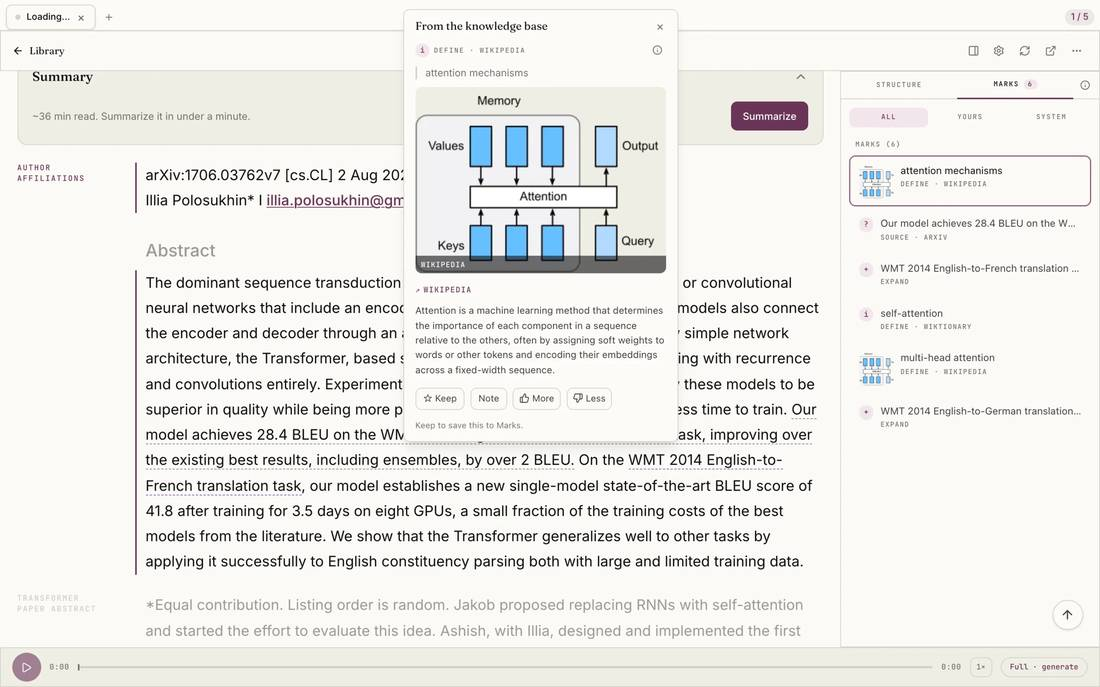
LiquidText gives you a workspace beside the document for excerpts and ink. This Omphalis example is a paper, Attention Is All You Need, in the reading view with an explanation of attention mechanisms open over the abstract. The paper stays on the page, so you can check the explanation against the authors' next sentences and close it when you are ready to read on.

Attention Is All You Need open on the abstract, with an explanation of attention mechanisms over that passage
Attention Is All You Need, with an explanation of attention mechanisms open over the abstract.

Select the image to see the detail.

Which would I try?

LiquidText, for working a document by hand

Keep LiquidText if you think by pulling excerpts onto a workspace, drawing links between them, writing in ink, and viewing documents side by side. That hands-on markup is what it is built for, and Omphalis is not trying to replace it.

Visit LiquidText →

Omphalis, for finishing a dense paper

Try Omphalis with one dense PDF or paper you saved and have not finished. Use the section map to reach the part you need, open an explanation where a term stops you, tag a passage Confusing, and ask a question whose answer cites the passage. Keep the original PDF open for figures, tables, and equations.

See the Omphalis reading workflow →

You can keep LiquidText for markup. Open the same difficult paper in both and see which one gets you through the hard section.

Also compare Omphalis with Pocket, Omnivore, Instapaper, Matter, Glasp, Readwise, Heptabase, NotebookLM, Snipd, MarginNote, Elicit, Mindgrasp or Eightify.
Before you choose

Is Omphalis a LiquidText alternative?

For some readers, yes, though it does a different job. LiquidText is an excerpt workspace: drag passages out of a document, link them back to the source, and, with Pro 2023 or LIVE, write in ink and view documents in parallel. Omphalis is for returning to dense PDFs and papers you saved and finishing them, with a cleaned reading view, explanations beside hard passages, marks that reopen the passage, Listen, and Ask with citations. Keep LiquidText if an excerpt canvas and ink are how you think.

Which PDF tools link every answer back to the page?

In Omphalis, Ask answers questions about your saved PDFs, articles, notes, and transcripts with citations you can follow back to the passage, so you can check each answer against the source. LiquidText links in a different way: every excerpt and note you make links back to the original document with a single click, and in Pro 2023 you can draw links between any two points. If the links you want start from your own excerpts, LiquidText does that well. If you want answers you can check against the passage, try Ask.

What is the best PDF annotation app for research?

It depends on the research task. For hands-on markup of documents you are working on (excerpts on a workspace, ink, links across documents, and Zotero and Mendeley integration in Pro 2023), LiquidText is built for it. For returning to a dense paper and understanding it, Omphalis gives you a section map, explanations beside the hard passages, marks with notes that reopen the passage, and Ask with citations. You can use both, and keep the original PDF for figures, tables, and equations either way.

Does Omphalis keep the original PDF layout?

No. Omphalis presents extracted text in a reading view, with a section map for moving through a long file. Keep the original PDF, in LiquidText or wherever you already read it, to check figures, tables, equations, and any layout that carries meaning.

Does Omphalis run on the same devices as LiquidText?

Not the same way. LiquidText has local apps for iPad, Mac, and Windows. Omphalis is a web app with iOS and Android apps and a browser extension; there is no desktop app. Omphalis Free is $0 and Pro is $9 a month or $90 a year, with a 30-day trial and no card. PDFs are read on paid plans and during the trial.

Written by Last updated