Omphalis vs Goodnotes
Goodnotes vs Omphalis: keep Goodnotes for handwriting, read the dense PDF in Omphalis
Keep Goodnotes for handwriting. Omphalis has no ink. Goodnotes is a note-taking app built around natural handwriting, on iPad, iPhone, Mac, Android, Windows, and the web. Your handwriting is searchable, you can write, highlight, type, and comment on a PDF, and audio you record stays synced to what you wrote. If handwriting, sketching a diagram, or working a problem by hand is the work, stay with Goodnotes.
Some people searching for a Goodnotes alternative have a different problem: the textbook chapter, the reading pack, or the long report is imported and marked up, and still not understood. Omphalis is a workspace for understanding. It helps you build understanding from the sources that matter to you, with a section map, an explanation beside the hard passage, and a mark that reopens it later. Keep Goodnotes for your notes. Read the dense PDF in Omphalis.
Start free
30-day trial, no card required. Includes 600 comprehension units, 200 Ask voice minutes and 15 assistant answers a day. After that, Free stays free. See plan allowances.
Disclosure: this comparison is written by Omphalis about its own product, so it is not a neutral review. We are not paid by Goodnotes or by anyone else to be compared favourably, this page carries no affiliate links, and every claim about Goodnotes is checked against their own public documentation. Read the full disclosures, and tell us if something here has gone out of date.
Checked October 20, 2026 against Goodnotes' homepage, PDF annotation page, students page, product facts page, and pricing page. Our suggestions about fit are our judgment.
Updated
What does Goodnotes do well, and when should you stay?
Goodnotes started on iPad in 2011 and says more than 25 million people use it each month. Goodnotes describes writing that feels like paper, and handwriting can be searched or converted to text. You can import contracts, reports, textbooks, and lecture slides, then handwrite, highlight, type, and comment on them, and export the annotated PDF to share. Audio recorded during a lecture stays synced to the moment you wrote. Study Sets turn your notes into flashcards, whiteboards give you an open canvas, notebooks can be edited together in real time, and the app works offline. A free plan is free forever, with limits. Stay with Goodnotes when handwritten notes, diagrams, math by hand, meeting notes with audio, or shared notebooks are the whole task.
What are the two jobs behind a Goodnotes alternative?
The first job is another handwriting notebook, often on Android or Windows. Omphalis is not one, and this page will not pretend otherwise. Omphalis has Android and web apps, but no ink. The second job is the dense PDF you imported to read: the chapter with three highlights on the first page and none after, or the report you marked up and could not explain the next morning. Marking a page is not the same as understanding it. This page is for that second job.
How do Goodnotes and Omphalis compare?
| Compared on | Goodnotes | Omphalis |
|---|---|---|
| Built for | Note-taking that combines natural handwriting with smart tools, for work, study, and everyday life. It started on iPad in 2011. | Getting through a dense source you chose, with explanations beside hard passages and marks that reopen them. Not a notebook. |
| Ink and handwriting | Yes. Handwriting is the core, with Apple Pencil support, handwriting search, and handwriting converted to text. | No ink, no handwriting, and no Apple Pencil support. If handwriting is the work, keep Goodnotes. |
| Formats | Notebooks, whiteboards, text documents, and imported PDFs, photos, textbooks, and lecture slides, plus audio recorded alongside your writing. | The PDF sits in the same Library as the articles, podcasts, and YouTube talks you saved on the subject, each opened the same way. |
| Reading view | The PDF page itself, which you handwrite, highlight, type, and comment on directly. | Extracted text with a section map. Keep the original PDF for figures, tables, equations, and layout that carries meaning. |
| Help with hard passages | A built-in assistant that Goodnotes says works across handwriting, typed text, sketches, and audio, with citations back to the page in your notebook. For students it describes breaking down dense lecture notes and testing you on the material. | Open an explanation (Source, Define, or Expand) beside a term the PDF assumes, or select a phrase and choose Learn more. The passage stays on the page. |
| Marks and return | Highlights, handwriting, and comments on the page, all searchable. Annotated PDFs can be exported and shared. | A mark, a note, and a tag such as Confusing, Important, Disagree, or Use later. The Marks rail and the Library Marks list reopen the passage with the text around it. |
| Listening | Records audio synced to the moment you wrote, so tapping a note plays what was said. | Listen reads the extracted text of the PDF aloud while you keep marking. |
| Study tools | Study Sets turn your own notes into flashcards. Whiteboards give an infinite canvas. | No flashcards and no whiteboard. |
| Platforms | iPad, iPhone, Mac, Android, Windows, and the web, with offline access. | A web app, iPhone and Android apps, and Chrome and Firefox extensions, with offline downloads on every plan. There is no desktop app. |
| Price | Free forever with limits. Essential is $11.99 a year and Pro is $35.99 a year, each with a 7-day free trial, on Goodnotes' pricing page. | Free is $0. Pro is $9 a month or $90 a year. PDFs are read on paid plans and during the trial. On Free a PDF is kept and is not read. |
What does reading a dense chapter look like in each?
Take Attention Is All You Need, the paper already used on the PDF page. In Goodnotes you import it, highlight the abstract, write a question in the margin with the pencil, and search your handwriting later. In Omphalis the paper opens as extracted text with a section map, so you can see its shape before you start. An explanation of attention mechanisms opens over the abstract while the next sentences stay on the page. You mark the paragraph, add a note about why it stopped you, and tag it Confusing. Later, the mark reopens that passage with the text around it. Omphalis shows extracted text, so diagrams, tables, and equations stay in the original PDF, and in Goodnotes if that is where you draw on them.
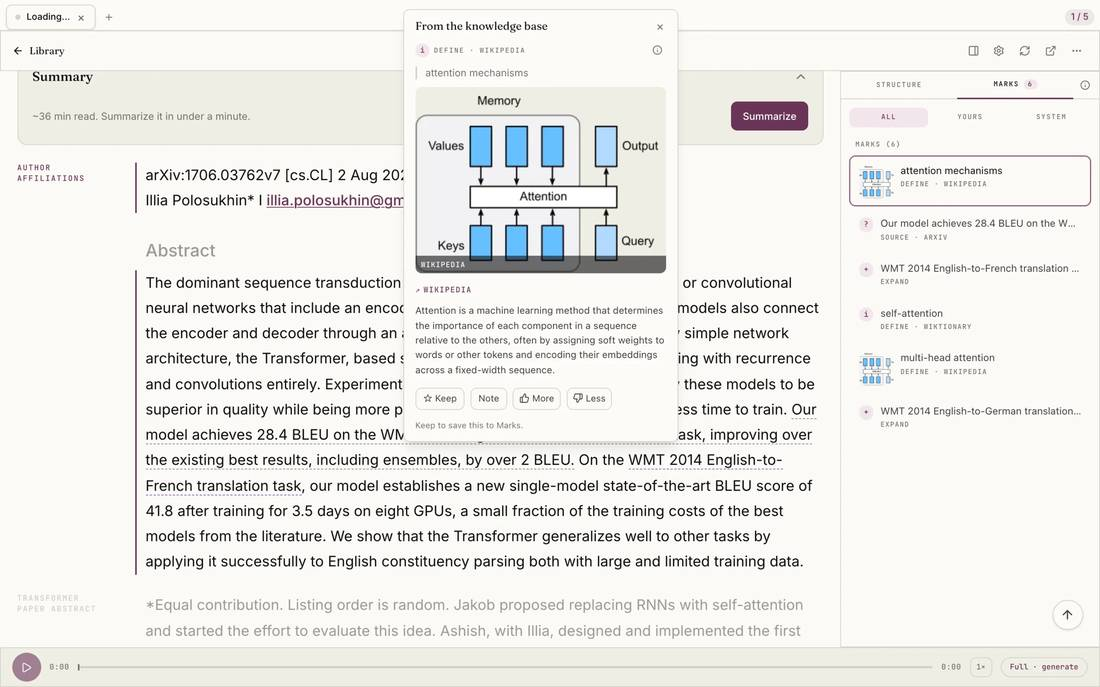
Select the image to see the detail.
Goodnotes, LiquidText, or MarginNote?
People weighing Goodnotes often look at LiquidText and MarginNote too. Choose Goodnotes for handwriting on notes and PDFs. LiquidText is an excerpt workspace where each excerpt links back to the document. MarginNote turns each highlight into a mind-map node and a flashcard. Omphalis is for getting through the source itself and coming back to the hard parts. If the PDFs are research papers kept in a reference manager, see Zotero as well.
How do you use Goodnotes and Omphalis together?
Keep lecture notes, sketches, and worked problems in Goodnotes. Read the assigned chapter in Omphalis on your phone or laptop, opening an explanation beside the paragraph that assumes something you have not met yet. Mark what stays unclear. Before the exam, open the Marks list and go straight back to those passages instead of rereading the whole chapter. The PDF can sit next to an article, a lecture, or a podcast on the same subject, and Listen reads it aloud when your eyes are done for the day. The routine for studying from PDFs walks through it step by step.
Who should pick which?
When should you stay with Goodnotes only?
Stay for handwriting, diagrams, math by hand, lecture or meeting notes with audio, flashcards from your own notes, or notebooks you share with a team.
Visit GoodnotesWhen should you add Omphalis?
Add it when imported readings stay unfinished, a hard passage needs an explanation beside it, or your PDFs belong next to the articles, talks, and podcasts on the same subject.
See the Omphalis web appWhat do Goodnotes and Omphalis cost?
Goodnotes has a free plan that is free forever, with limits on files, storage, and audio. Essential is $11.99 a year and Pro is $35.99 a year, each with a 7-day free trial, and Pro adds library sync across Apple and non-Apple devices, on Goodnotes' pricing page in US dollars. Omphalis Free is $0. Pro is $9 a month or $90 a year. PDFs are read on paid plans and during the trial. On Free a PDF is kept and is not read.
30-day trial, no card required. Includes 600 comprehension units, 200 Ask voice minutes and 15 assistant answers a day.
The trial does not add ink, handwriting, a whiteboard, flashcards, or a desktop app. Those limits stay on every plan. Plan details are on pricing.
A good Goodnotes alternative for reading dense PDFs
If you want another handwriting notebook, compare other note-taking apps. Omphalis has no ink. If you import textbooks, readings, or reports to read and keep getting stuck, Omphalis opens the PDF with a section map, explanations beside hard passages, marks with notes that reopen the passage, and Listen. Keep Goodnotes for handwritten notes and read the source in Omphalis.
Also compare Omphalis with Pocket, Omnivore, Instapaper, Matter, Glasp, Readwise, Heptabase, NotebookLM, Snipd, LiquidText, MarginNote, Elicit, Zotero, Adobe Acrobat, Perplexity, Mindgrasp, Eightify or Recall.
Before you choose
Is Omphalis a Goodnotes replacement?
Not for handwriting. Goodnotes is a notebook built around natural handwriting, sketches, whiteboards, and audio recorded alongside your notes. Omphalis has none of that. If you import dense PDFs to read and keep getting stuck, Omphalis is a workspace for understanding them, with a section map, explanations beside the hard passage, and marks that reopen it. Many readers can keep both.
Can I write on a PDF with Apple Pencil in Omphalis?
No. Omphalis has no ink and no handwriting. You select text to highlight it, add a typed note, and tag the mark. If writing by hand on the page is how you think, keep Goodnotes for that.
Which devices does Omphalis run on?
Omphalis is a web app with iPhone and Android apps and Chrome and Firefox extensions, all reading from the same Library. Offline downloads are on every plan. There is no desktop app and no Apple Pencil support.
Goodnotes has an assistant too. What is different?
Goodnotes describes its assistant as working across your handwriting, typed text, sketches, and audio, with citations back to the page in your notebook. Omphalis works on the source you are reading: an explanation opens beside the passage that stopped you, the passage stays on the page, and the mark you leave reopens it later. Ask answers across your saved sources and cites the passage.
Goodnotes, LiquidText, or MarginNote?
Goodnotes is for handwriting on notes and PDFs. LiquidText is an excerpt workspace beside the document. MarginNote turns highlights into mind maps and flashcards. Omphalis is for getting through the source and coming back to the hard parts. The LiquidText and MarginNote comparisons go further.
Written by Omphalis teamLast updated