How to Track Reading Progress Beyond Pages Finished
Updated · 14 min read

Listen to this post
Contents
- TL;DR
- Table of Contents
- What most reading trackers measure
- The three metrics, and what each one hides
- A basic tracking setup in ten minutes
- Why progress should include understanding
- A better progress record for papers and long reads
- A worked example
- Reading primary literature is a skill
- Match the tool to the kind of reading
- How Omphalis fits: progress that includes understanding
- Our perspective: speed is the wrong scoreboard
- Habits that make tracking stick
- Keep the log small
- Read a mix of easy and hard
- Use the five-finger rule only for what it is
- Review weekly, not daily
- Keep your own writing close
- Trying it on your own reading list
- FAQ
- What is the best way to track reading progress?
- Should I track pages, time or percentage?
- How do I know if I really understood what I read?
- Can I track reading across articles, PDFs and podcasts?
- Is reading faster the same as reading better?
- Sources
- Recommended
The simplest way to track reading progress is to log three things: what you are reading, how far you got, and how often you sit down to read. Any timer, spreadsheet or app can do that. The harder question is whether the number tells you anything about what you took in. For novels, probably not much matters. For papers, reports and long articles you need to use, a percentage bar says little about whether you understood the text. This guide covers both: the basic tracking setup, and the extra layer that makes progress mean something.
TL;DR
- Track three basics: sessions (time), position (pages or percent) and consistency (how many days a week you read).
- Page counts and streaks measure completion, not comprehension. For study and work reading, add a note or a question to every session.
- Research on retrieval practice suggests that testing yourself beats rereading for long-term retention.
- Keep your progress, notes and source passages in one place, so you can return to a text without starting over.
- Review weekly: what did you finish, what did you learn, what is stalled?
Table of Contents
- What most reading trackers measure
- The three metrics, and what each one hides
- A basic tracking setup in ten minutes
- Why progress should include understanding
- A better progress record for papers and long reads
- Match the tool to the kind of reading
- How Omphalis fits: progress that includes understanding
- Our perspective: speed is the wrong scoreboard
- Habits that make tracking stick
- Trying it on your own reading list
- FAQ
- Sources
What most reading trackers measure
Open any popular reading-tracker app and you will find the same core ideas. According to the Bookly site, digital trackers center on reading sessions (time spent), page progress (pages read or percent complete) and consistency (streaks). Some tools automate this with timers or barcode scanning; others rely on a manual log.
That design suits what these apps are for: building a habit and keeping a tally of books. If your goal is "read 30 books this year," a counter with a streak does the job well, and you do not need anything more elaborate.
The limits show up when your reading is work. Think of a graduate student with 40 papers for a literature review, or an analyst reading industry reports on a deadline. For them, "I got through 80% of this PDF" is a weak signal. You can reach 100% and still be unable to explain the argument.
The three metrics, and what each one hides
| Metric | What it tells you | What it hides |
|---|---|---|
| Time per session | Whether you made room to read | Whether you were focused, or stuck on one paragraph |
| Pages or percent | How much of the text is behind you | Whether you understood it, or skimmed |
| Streaks and frequency | Whether reading is a habit | Whether the habit produces anything you can use |
None of these is wrong. They answer "did I read?" rather than "did I learn?" Pair them with a quality signal and you get a much better picture.
Another point from the research is worth keeping in mind. Rasinski and colleagues, in a paper on reading fluency, note that speed and automaticity often get the lion's share of attention, yet they are only one component of fluency. Reading well also means keeping comprehension intact while handling complex material. A tracker that rewards speed alone can quietly push you the wrong way.
A basic tracking setup in ten minutes
If you want something simple, start here. You can do it in a notes app, a spreadsheet or a paper notebook.
- List what you are reading now. Keep it short. Three to five active items is plenty. Include articles, papers, ebooks and podcasts, not only books.
- Record a start date and a target. "Finish by Friday" beats "someday." For a long book, set a daily page or time goal instead.
- Log each session in one line. Date, minutes, where you stopped. Ten seconds, no more.
- Add one sentence after each session. What was the main point? What confused you? This is the step most trackers skip, and it is the most useful one.
- Review once a week. See what moved, what stalled, and what you should drop.
If you want to build the weekly review into a broader study routine, this evidence-backed weekly review for students shows how to use a regular check-in to catch problems early rather than cramming at the end.
Why progress should include understanding
Three strands of research point the same way: finishing a text is not the same as learning from it.
Retrieval beats rereading. A review of retrieval practice in classrooms describes testing as a low-stakes way to improve learning, and frames reading as a learning activity rather than a completion task. In practice, that means pausing to recall or answer a question about what you just read, rather than moving on to the next page.
Dense material invites shallow reading. Researchers at Huda Lab, in their work on just-in-time questions for reading, observe that students and academics reading dense literature can end up with a cursory understanding or a wrong interpretation. Their answer is to support reading with questions that prompt active, critical engagement, not to count pages.
Speed gains are real but limited. In a study of timed repeated reading, English as a foreign language students read 26 passages over 13 weeks, each one five times, and answered comprehension questions along the way. The takeaway for trackers: reading rate can be trained, but it is only worth tracking next to comprehension.
For checking understanding while you read, active reading and self-testing tools show how practice questions with rationales and spaced repetition can turn passive study into something you can measure.
A better progress record for papers and long reads
Here is a record that works for work and study reading. For each text, capture:
- Status: not started, reading, finished, parked.
- Position: where you stopped, so you can resume.
- Purpose: why you saved it. A text without a purpose rarely gets finished.
- Key passages: the two to five excerpts that carry the argument.
- Your notes: your own words, attached to those passages.
- Open questions: what you still do not understand.
- Next step: reread, cite, discuss, or discard.
A text is "done" when you can state its argument and point to where it makes it. That is a stricter bar than 100%, and a more honest one.
A worked example
Say you are a first-year doctoral student with a reading list of twelve papers for a seminar. A page-count tracker shows you 60% through the list by Wednesday. Looks fine.
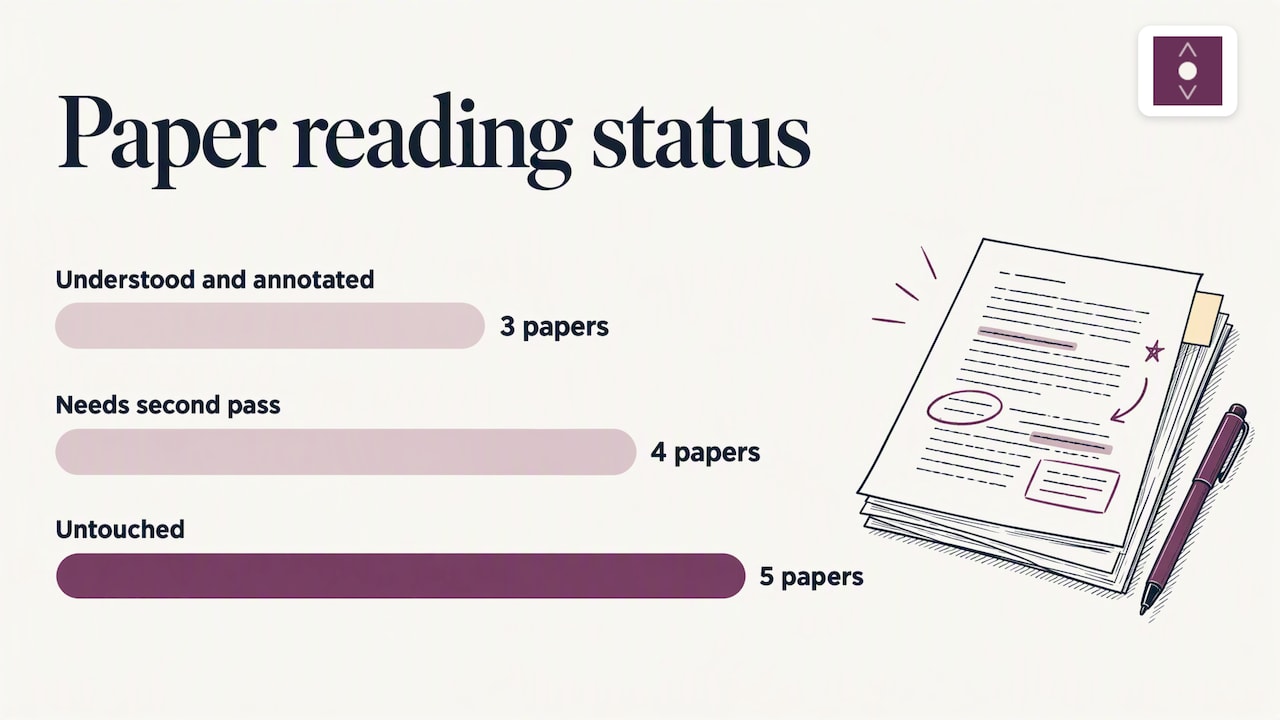
Now apply the richer record. Of the seven papers you "read," three have notes tied to specific passages and a one-line summary. Two you skimmed and cannot summarize. Two you stopped understanding halfway, because of a statistical method you did not know. Your real progress is three papers done, four needing a second pass, five untouched. That is not a 60% picture, but it is the one that helps you plan Thursday.
Reading primary literature is a skill
A chapter on collaborative annotation points out that reading primary literature is often assumed rather than taught to doctoral students and academics. Its authors found that annotating a text together with peers reduced reading apprehension and helped readers correct mistakes as they went. Even if you read alone, the lesson carries: marks and comments on the text, made while you read, turn it from something you get through into something you work with.
Match the tool to the kind of reading
No single tracker fits every reader. Here is a quick way to choose by type of reading.
| If you mostly read... | You need | Tool type |
|---|---|---|
| Novels and nonfiction for pleasure | Book log, goals, streaks | A dedicated book tracker app |
| Papers and reports for study | Position, notes tied to passages, questions | A reading workspace with annotation |
| Many saved web articles | A queue you can finish and search | A read-later tool built around finishing |
| Podcasts and video | Timestamps, key moments, transcripts | A tool that handles audio and video alongside text |
| Everything | One place for notes and sources | A notebook that connects formats |
Book trackers are good at what they do. If your reading is mostly for leisure, a streak counter and a yearly goal are a great fit. If your reading feeds essays, exams or decisions at work, you will want the tool to keep your thinking next to the source.
How Omphalis fits: progress that includes understanding
We built Omphalis for the second kind of reader: people who save articles, papers and videos and then struggle to do anything with the pile. Our approach to progress is simple. Reading is not finished when you reach the end; it is finished when you can use what you read.
Here is what that looks like in practice, based on what the product does:
- Save from anywhere. Import PDFs, EPUBs, Word documents and feeds, or clip pages with the browser extension for Chrome and Firefox.
- Read in a cleaned, structured view. Content is cleaned and organized so you can focus on the text instead of fighting the layout.
- Get explanations inline. When a passage is hard, you can ask for an explanation without leaving the source.
- Attach notes to the original passage. Your notes stay next to the exact words that prompted them, so a month later you can see what you were reacting to.
- Ask questions and get citations. The ask feature answers questions about your reading with citations back to the source, so you can check the answer against the text.
- Listen with natural voice narration. Useful for commutes, or when your eyes are tired.
- Organize into notebooks and export. Your work stays portable.
You can see the reading environment on the web app page, and read our reasoning in the case for comprehension.
Our perspective: speed is the wrong scoreboard
Most tools in this space lean toward speed: summaries, shortcuts, bigger numbers. We think that trades one problem for another. A summary can leave you with the feeling that you understand something while the actual understanding is missing. That feeling of false fluency is what we try to avoid.
So we measure reading differently. A good session ends with something you can use: a marked passage, a note in your words, a question answered with a citation, a connection to something else you saved. We have written about how to run a reading session so it ends with something you can use, and the idea is the same here. Track the output of reading, not only the input.
This does not mean every text needs deep work. Most things you save should be skimmed, triaged or dropped, and that is fine. The point is to decide on purpose, and to keep the full source in front of you when it matters. If you want the longer version of our thinking, read our manifesto on building for understanding.
— Omphalis Team
Habits that make tracking stick
Keep the log small
If logging takes more than a few seconds, you will stop. Record the minimum, then add one sentence of substance.
Read a mix of easy and hard
The research on repeated reading found rapid early gains that taper off, so it helps to keep introducing new or harder material. Your tracker should have room for a stretch text alongside comfortable ones.
Use the five-finger rule only for what it is
The five-finger rule is a library heuristic for early readers: on a page, 0 to 1 unknown words is too easy, 2 to 3 is just right, and 4 to 5 is too hard. The Penn State guide also notes that it should not stop a reader from exploring a high-interest, challenging topic. For adult study reading, treat it as a rough signal of how much support a text will need, such as a glossary or an explanation tool.
Review weekly, not daily
A short weekly look at what you finished, what you learned and what is stuck beats a daily guilt check. Move parked items to a "later" list on purpose.
Keep your own writing close
If you read in order to write, keep drafts and sources together. We explore this in keeping your own writing and other people's reading in one place. For building a long-term archive, see our piece on the digital commonplace book.
Trying it on your own reading list
Start with the free plan and import the five items you most want to finish. Read one with notes attached to passages, ask a question or two, and see how it feels compared with a page counter. Paid plans include the fuller feature set: deep reading, PDF extraction, advanced listening and import and export.
Plans as published on our pricing page:
| Plan | Monthly | Yearly |
|---|---|---|
| Free | No published price | No published price |
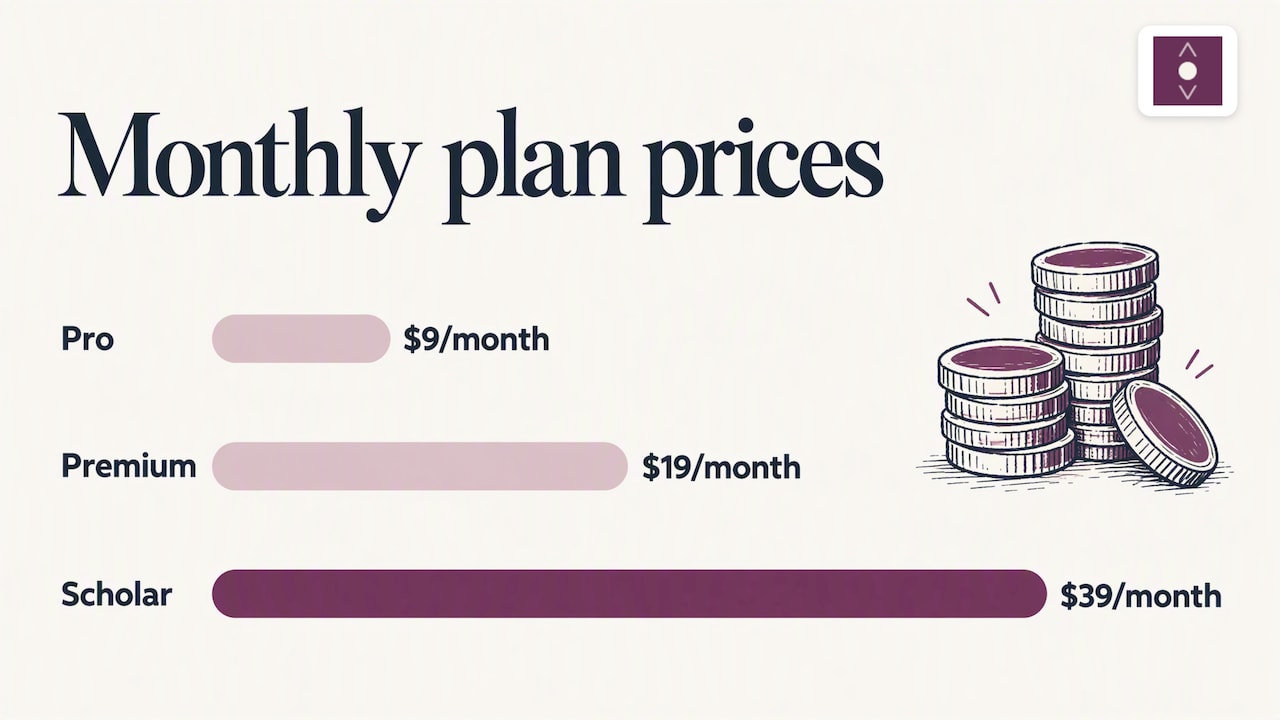
| Pro | $9 per month | $90 per year |
| Premium | $19 per month | $190 per year |
| Scholar | $39 per month | $390 per year |
Unit packs are also available, from $10 one-off. If you are weighing your options for a saved-reading queue, our guide to read-later apps that help you finish what you save lays out the criteria. You can also look at how we compare with Readwise Reader or Heptabase on our own pages. Ready to start? Open Omphalis and import your first text.
FAQ
What is the best way to track reading progress?
For leisure books, log pages or percent plus a simple streak. For study and work reading, add a one-line note on what you learned and keep key passages with your notes. The second layer shows whether you understood the text, which a percentage cannot.
Should I track pages, time or percentage?
Use whichever matches the format. Pages suit print books, percentage suits ebooks and PDFs where page counts vary, and time suits podcasts, audiobooks and dense material where pages mislead. Many readers log time and position together.
How do I know if I really understood what I read?
Close the text and try to state the main argument from memory, then check yourself against the source. Retrieval practice, meaning testing yourself instead of rereading, is described in classroom research as a stronger route to retention. Questions answered with citations to the text make the check easy.
Can I track reading across articles, PDFs and podcasts?
Yes, if you use one place that accepts all of them. Omphalis handles articles, papers, podcasts and videos, plus imports of PDFs, EPUBs, Word documents and feeds, so your notes and progress are not split across apps.
Is reading faster the same as reading better?
No. Reading rate can improve with practice, but fluency also involves expression and understanding. Track comprehension alongside speed so you do not trade one for the other.
Sources
- Bookly: book tracker and reading tracker
- Rasinski and colleagues on reading fluency (Grand Valley State University)
- Using retrieval practice and metacognitive skills to improve content learning
- Huda Lab: just-in-time questions for reading
- Improving reading rates and comprehension through timed repeated reading
- Social collaborative annotation and primary literature
- Penn State: just right text and the five-finger rule